

TikTok Ads can only optimize as well as the event data your PrestaShop store sends. A purchase event may appear in Events Manager and still be unsuitable for catalog-based advertising if its product identifier, value, or currency does not match the corresponding catalog item. These are parameter mismatches: the browser pixel or server-side Events API reports one version of a product transaction, while the TikTok catalog expects another.
For ecommerce managers, the impact is larger than a reporting discrepancy. Mismatched parameters weaken product matching, distort revenue measurement, and reduce the quality of signals available for optimization and retargeting. This is especially important for Dynamic Product Ads and Smart Ads workflows that depend on reliable product-level behavior.
The parameters that must stay aligned
Three fields deserve particular attention: content_id, value, and currency.
content_id must match the catalog ID exactly
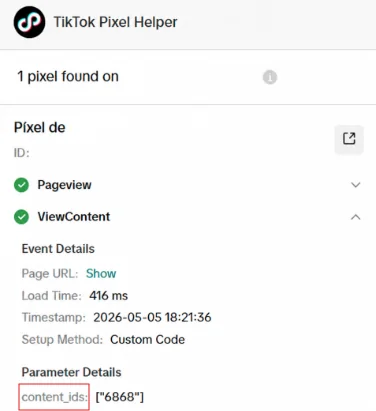
content_id identifies the product involved in a ViewContent, AddToCart, InitiateCheckout, or Purchase event. TikTok uses this identifier to connect shopper behavior to a catalog item. The ID sent in the event must match the item ID used in your TikTok catalog feed exactly, including formatting, prefixes, capitalization, and variation logic.
A common PrestaShop problem is sending the parent product ID in events while the catalog contains combination or variant IDs. For example, an event may send 125, while the feed lists 125-red-m or a numerical combination identifier. Other stores use a SKU in the catalog but send PrestaShop’s internal product ID through the pixel. Neither approach is inherently wrong; inconsistency is the problem.
When IDs do not align, TikTok may receive the conversion but cannot reliably associate it with the viewed or purchased catalog product. That limits product retargeting and makes product-level analysis less trustworthy.
value must represent the actual event value

The value parameter should be a numeric monetary amount that reflects the action being tracked. For a purchase, this normally means the final order value your advertising measurement strategy is intended to use. For cart and checkout events, it should represent the current basket value consistently.
Problems arise when one implementation sends product unit price, another sends cart subtotal, and a third sends an order total including tax, shipping, or discounts. A decimal-format error can be equally damaging: 39,99 may not be interpreted like 39.99, while a value multiplied by 100 can turn a €39.99 order into 3,999.
Inconsistent values distort return-on-ad-spend calculations and can feed unreliable purchase-value signals into optimization.
currency must use the correct ISO code
TikTok event currency should be a valid three-letter ISO 4217 code, such as USD, EUR, or GBP. It must correspond to the currency used for value and, where relevant, the currency configured for the catalog and ad account.
Sending a symbol such as €, a localized label such as EURO, or the shop’s default currency when the customer checked out in another currency creates ambiguity. Multi-currency PrestaShop stores need to send the order’s actual transaction currency, not simply a fixed configuration value.
Why browser and server events can make mismatches worse

Many stores use both the TikTok browser pixel and Events API, which is the right architecture for more resilient tracking. However, the two sources must send equivalent business data for the same shopper action.
If the browser sends content_id: “SKU-RED-M” and the server sends content_id: “125”, TikTok receives conflicting versions of one event. If their event_id values also differ, the platform may treat them as two separate events rather than deduplicating them. The result can be inflated conversions alongside incomplete catalog matching.
Deduplication requires the browser and server copies of the same action to share a consistent event_id. Parameter consistency ensures that the deduplicated event remains meaningful for attribution, optimization, and catalog activation.
How to diagnose it

Start by comparing four places: the PrestaShop product and combination data, the TikTok catalog feed, browser pixel requests, and Events API payloads. Inspect a test product with a variant, a discount, and—if applicable—a non-default currency.
Check that ViewContent, AddToCart, InitiateCheckout, and Purchase use the same ID convention. Then confirm that the sent content_id exists in the catalog exactly as transmitted. Review value as a number, verify its calculation basis, and ensure currency is a three-letter code matching the transaction. Finally, compare browser and server copies of the same event: they should carry the same event_id and compatible product and revenue parameters.
Do not rely only on an event being marked as received. An event can be technically delivered while remaining unusable for accurate product matching.
How Pixel Track TikTok solves it
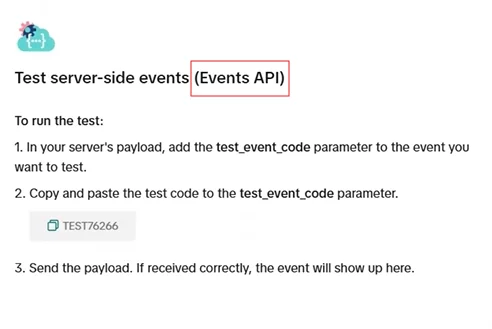
Pixel Track TikTok is built for PrestaShop 1.7 through 8.2 and sends both browser pixel and server-side Events API events from a single tracking implementation. It tracks PageView, ViewContent, AddToCart, InitiateCheckout, and Purchase with core commerce parameters including content_id, content_name, value, currency, and event_id.
Using one module to generate these payloads reduces the risk that a theme-level browser script and a separate server integration apply different product-ID or currency rules. For matching browser and server events, Pixel Track TikTok uses a shared, consistent event_id for deduplication.
The operational goal is simple: choose an identifier strategy that matches the TikTok catalog, maintain it across every funnel event, and pass the order’s real monetary data consistently. With aligned catalog and event parameters, TikTok receives cleaner signals for reporting, optimization, and product-focused advertising.