
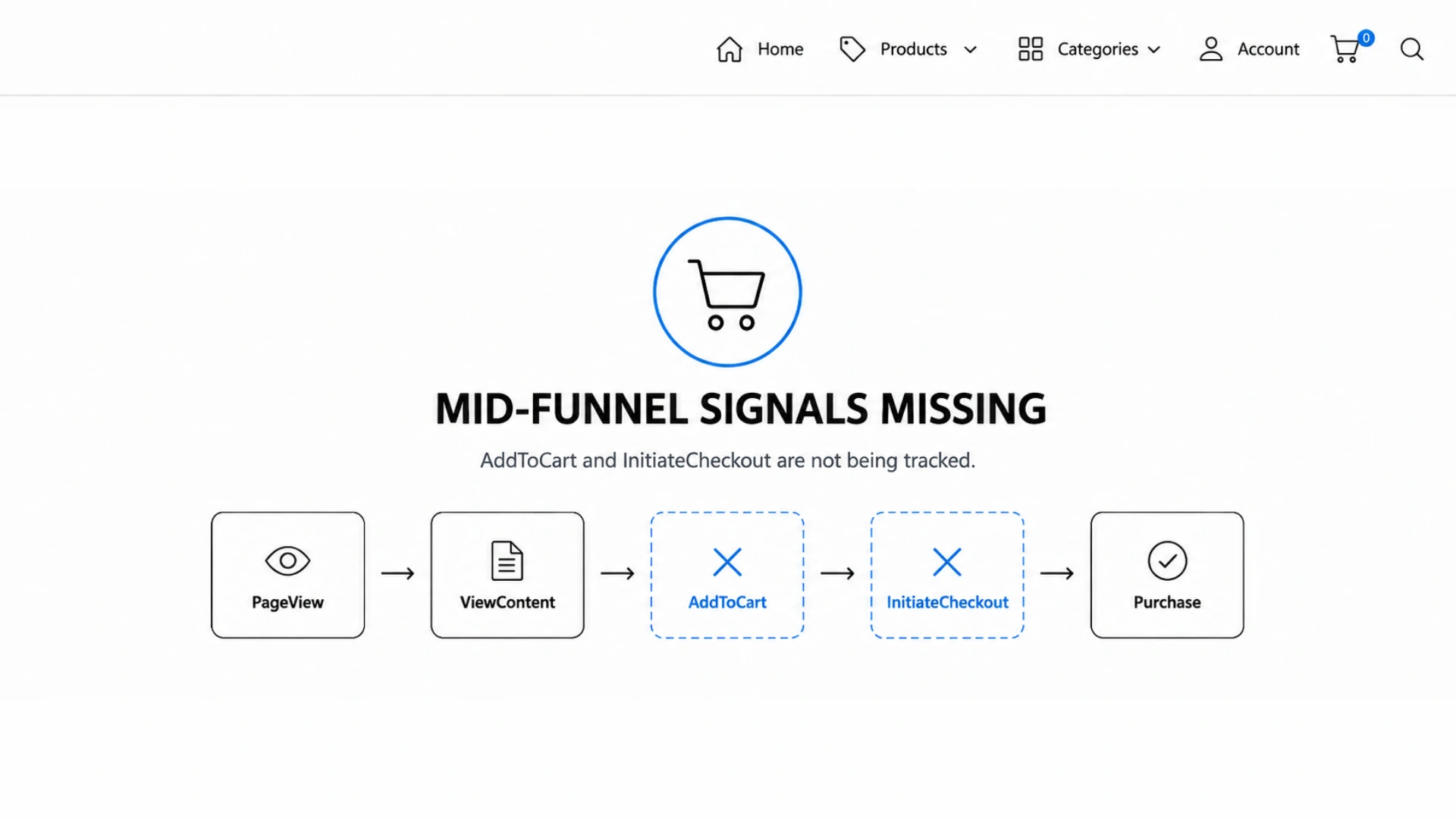
When TikTok Ads campaigns underperform despite healthy creative and competitive bids, the diagnosis is rarely obvious. Most PrestaShop store owners assume the pixel is working because they can see Purchase events firing in TikTok Events Manager. What they cannot see is everything that is not firing — the ViewContent, AddToCart, and InitiateCheckout events that TikTok’s algorithm depends on to understand the full shape of buyer intent across your funnel.
This partial coverage problem is far more common than the industry acknowledges. The majority of generic TikTok pixel integrations for PrestaShop — whether installed as lightweight modules or added through Google Tag Manager workarounds — implement only the two events that are easiest to bind: PageView on every page load, and Purchase on the order confirmation hook. The three mid-funnel events are either omitted entirely, misfired without correct parameters, or silently dropped by AJAX interactions that bypass traditional page-load tracking. The result is a tracking setup that looks functional on the surface but is structurally incomplete underneath.
The consequences are not abstract. TikTok’s Smart+ and standard campaign optimization models are machine learning systems that require high-frequency behavioral signals to calibrate bid strategies, audience expansion, and ad delivery. When mid-funnel events are absent, the algorithm is forced to optimize on a sparse, delayed signal — the Purchase event — that arrives too infrequently and too late in the session to drive efficient learning. This article dissects exactly why partial event coverage happens on PrestaShop, what TikTok loses when those signals go missing, and what a complete, correctly parameterized 5-event implementation actually looks like at the technical level.
Why PrestaShop Integrations Miss Mid-Funnel Events: Root Causes in Hook Architecture and AJAX Interactions
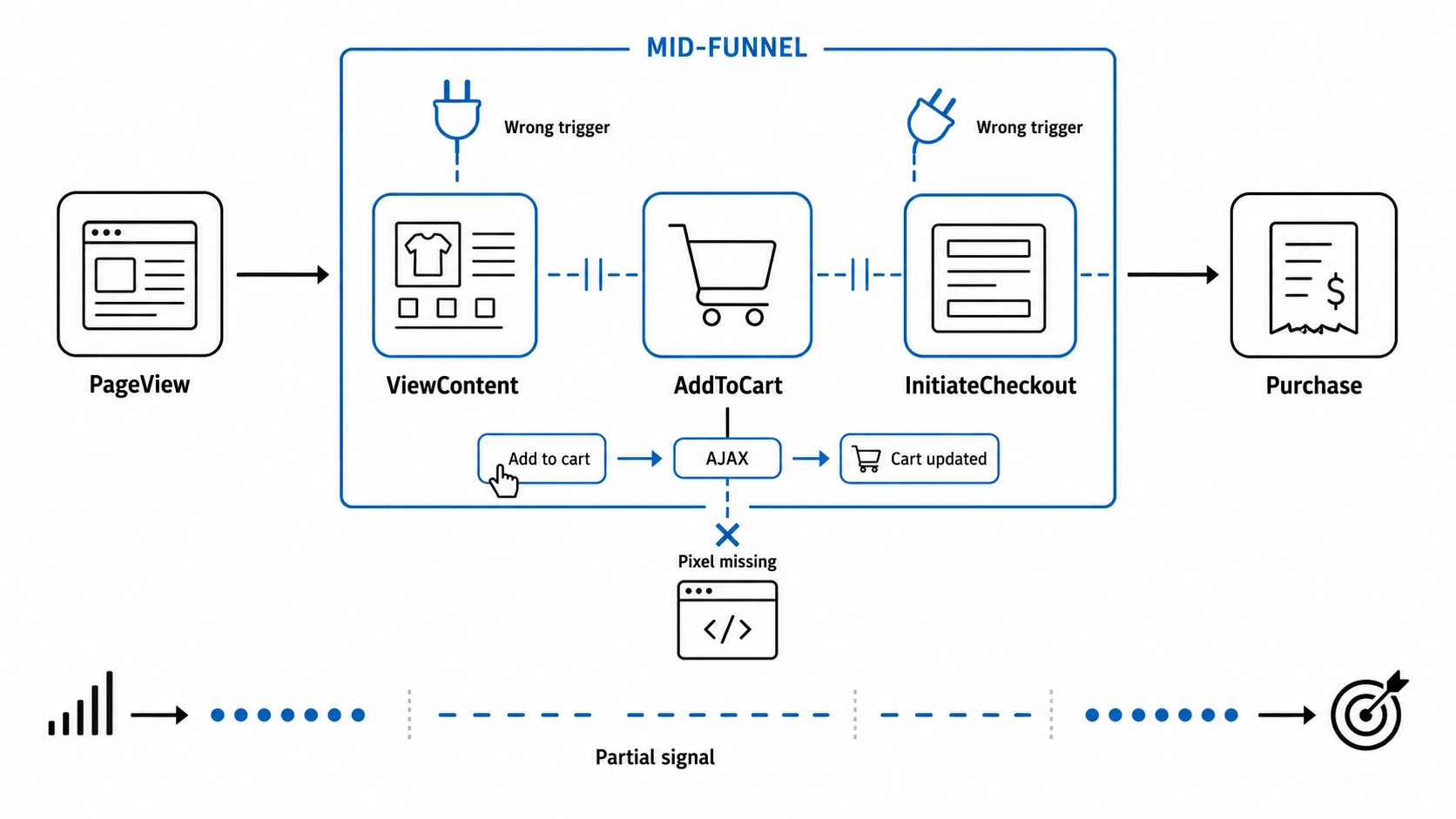 The PrestaShop hook system is the backbone of any event-driven integration. To fire a tracking event at the right moment, a module must bind to the correct hook — and for mid-funnel TikTok events, the correct hooks are far less obvious than they are for PageView or Purchase. This is where most generic implementations fail at the architectural level.
PageView is trivially easy: bind to displayHeader or actionDispatcher and emit ttq.page() on every request. Purchase is similarly straightforward: PrestaShop fires the actionValidateOrder and displayOrderConfirmation hooks with a populated order object, giving the module everything it needs to construct a complete Purchase event payload. These two hooks are well-documented, stable, and synchronous — they work the same way across nearly every PrestaShop theme.
Mid-funnel events are a different story entirely. Consider ViewContent, which should fire when a shopper views a product page with the correct content_id, content_name, value, and currency parameters. The correct hook is typically displayProductButtons or displayFooterProduct, and the module must query the product object to extract the catalog ID and price. Many generic integrations either skip this hook entirely or bind to a broader hook like displayHeader and attempt to infer product context from URL patterns — a fragile approach that fails on SEO-friendly URLs, multi-language stores, and custom routing configurations.
AddToCart is where the gap becomes critical. In modern PrestaShop 1.7 and 8.x themes — including the default Hummingbird theme and most commercial themes — the add-to-cart action is handled entirely via AJAX. The shopper clicks the button, a JavaScript fetch or XMLHttpRequest call is made to the cart controller, and the cart drawer or mini-cart updates without any page reload. A module that relies on a server-side hook such as actionCartSave will technically execute on the server, but it has no mechanism to inject a client-side ttq.track(‘AddToCart’, {…}) call into an already-rendered page. The event is silently lost.
Therefore, how PrestaShop executes these hooks and AJAX calls directly creates four primary failure modes for mid-funnel tracking:
- actionCartSave fires server-side: no DOM context, no pixel injection point for the in-progress AJAX response.
- displayShoppingCartFooter fires only when the full cart page (/index.php?controller=cart) is loaded — not on AJAX cart updates from product or category pages.
- The gap between server-side hook execution and client-side pixel firing means AddToCart events vanish entirely for the majority of add-to-cart interactions in any theme with a cart drawer.
- InitiateCheckout binding failures: generic modules frequently miss the checkout controller load or bind to hooks that fire on every checkout step, resulting in either missing signals or duplicate InitiateCheckout events rather than a single correctly-timed signal.
What TikTok’s Algorithm Actually Loses Without Mid-Funnel Signals: The Optimization Data Deficit
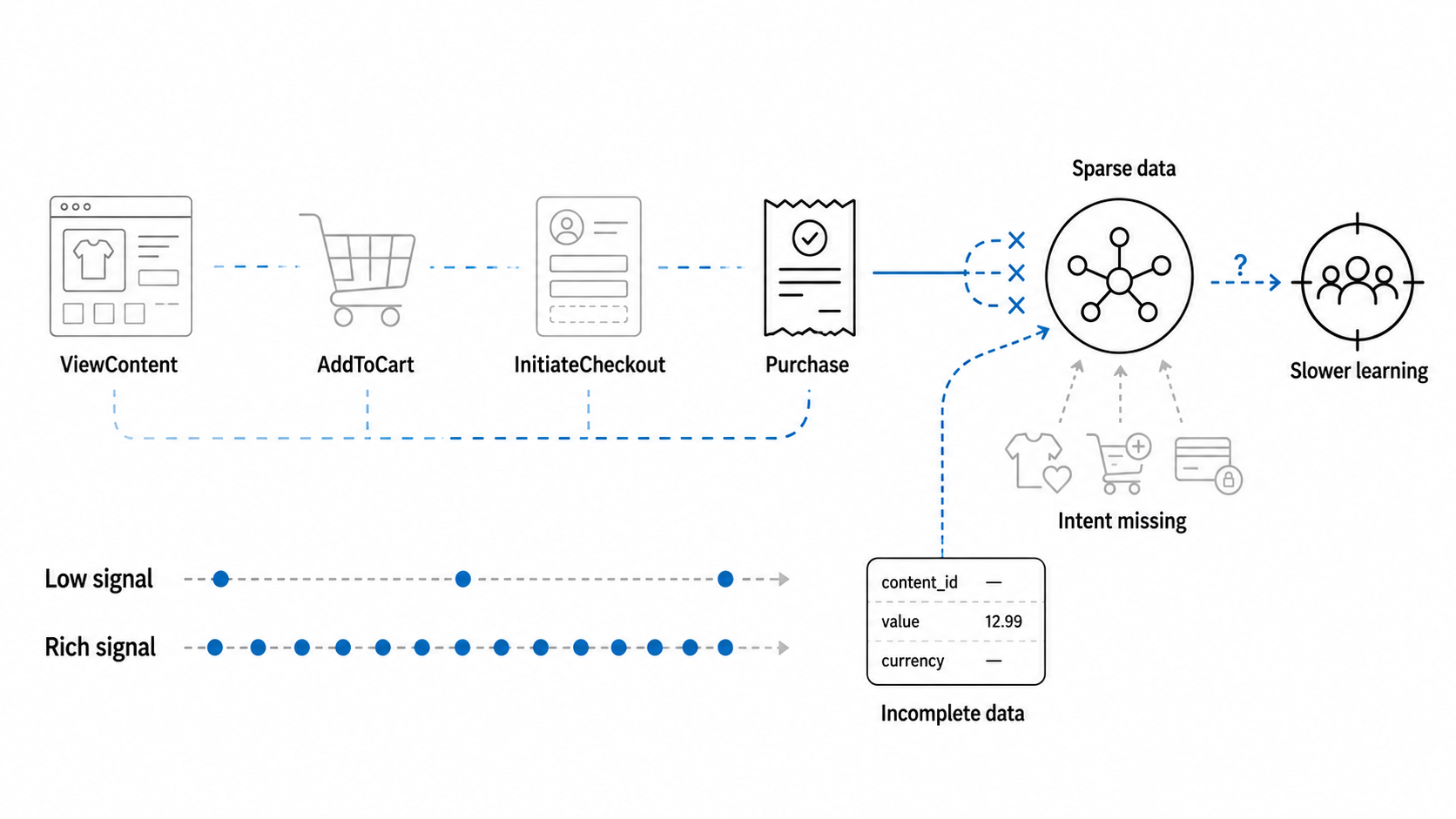 To understand the real cost of partial event coverage, it is necessary to understand how TikTok’s campaign optimization model consumes conversion signals. TikTok Ads uses a value-based bidding and delivery system built on observed behavioral patterns across its advertiser ecosystem. When you set a campaign to optimize for Purchase conversions, the algorithm does not simply wait for Purchase events and adjust bids accordingly. It builds a predictive model of purchase probability that is calibrated continuously by the full sequence of micro-conversion signals leading up to the purchase.
ViewContent, AddToCart, and InitiateCheckout events are not supplementary data — they are the training features for that predictive model. Each event carries timestamps, content identifiers, value signals, and session context that the algorithm uses to answer a core question: given this user’s current behavioral pattern, what is the probability they will complete a purchase within the attribution window? Without mid-funnel events, the algorithm cannot answer that question with any precision. It can only observe who eventually purchased, not who was close to purchasing but dropped off, or who showed high-intent signals that should have triggered more aggressive bid adjustments.
The practical consequence is what practitioners call the learning starvation problem. TikTok’s algorithm requires a minimum volume of optimization events to exit the learning phase — typically around 50 conversion events per ad group per week as a baseline threshold. For most PrestaShop stores, Purchase events alone rarely meet this threshold at the ad group level, particularly in the early weeks of a campaign or in niche verticals with lower transaction volumes. When the algorithm is deprived of mid-funnel events that could serve as proxy optimization targets, it cannot graduate from exploratory delivery into efficient exploitation of high-performing audience segments.
To see how this optimization deficit directly impacts campaign delivery on a practical level:
- A store generating 30 purchases per week but 400 AddToCart events has a rich optimization signal available — but only if AddToCart is tracked and passed to TikTok correctly.
- Consequently, without AddToCart data, the algorithm sees only 30 weekly conversions: well below the learning threshold, leaving campaigns stuck in permanent exploration mode and burning budget on audience testing rather than scaling proven converters.
- By contrast, with full funnel coverage, the algorithm can optimize on AddToCart as a high-frequency proxy, build a purchase-prediction model anchored in real behavioral data, and graduate to efficient delivery significantly faster.
The parameter completeness problem compounds the signal volume problem. Even when mid-funnel events are technically firing, they frequently lack the required parameters that make them actionable for TikTok’s catalog-based optimization features. A ViewContent event without content_id cannot be matched against your TikTok product catalog, which means Dynamic Showcase Ads cannot use it for retargeting. An AddToCart event without a value parameter cannot contribute to value-based optimization models. An InitiateCheckout event without currency renders the value field ambiguous across multi-currency stores. TikTok Events Manager will report these events as received, but it will silently downgrade them in the optimization stack because they lack the structured data needed to connect behavioral signals to specific products and price points.
This creates a deceptive situation: your Events Manager dashboard shows events firing, your coverage metrics appear green, but the underlying data quality is insufficient for TikTok’s algorithm to use those events meaningfully. The gap between event receipt and event utility is invisible in standard reporting, which is precisely why so many PrestaShop advertisers run campaigns for months without realizing their optimization foundation is structurally broken.
Concrete Failure Patterns: How Mid-Funnel Gaps Manifest in PrestaShop Configurations
 The abstract architecture problems described above translate into specific, repeatable failure patterns that surface consistently across PrestaShop installations. Understanding these patterns in concrete terms is the first step toward diagnosing whether your own implementation is affected — and most are, in at least one of the following ways.
The most common pattern is the ghost AddToCart scenario. A PrestaShop store running a standard theme with an AJAX cart drawer will process hundreds of add-to-cart interactions per day, none of which appear in TikTok Events Manager. The server-side actionCartSave hook fires correctly and could theoretically pass data to a tracking module, but because no page reload occurs, there is no mechanism to inject the pixel call into the browser session. The module logs the event internally, the developer sees no PHP errors, and the integration appears healthy from the server side. From TikTok’s perspective, the signal never existed. Stores in this situation typically see a ViewContent-to-AddToCart ratio in TikTok Events Manager that is wildly inconsistent with their actual site behavior — often reporting zero AddToCart events against hundreds of ViewContent events — while their PrestaShop back office shows a completely normal add-to-cart rate.
A second recurring failure pattern involves InitiateCheckout being bound to the wrong lifecycle point in PrestaShop’s one-page checkout. Some integrations fire InitiateCheckout on every step transition within the checkout controller — address entry, shipping selection, payment method selection — rather than once on the initial checkout page load. This produces event multiplication: a shopper who completes checkout triggers three or four InitiateCheckout events instead of one. TikTok Events Manager counts them all, and the ratio between InitiateCheckout and Purchase appears inflated. The advertiser sees what looks like a high drop-off rate between checkout initiation and purchase, makes creative or pricing changes to address a funnel problem that does not actually exist, and wonders why conversion rates do not improve.
A third pattern specifically affects multi-language and multi-currency PrestaShop stores. Generic modules that attempt to read product price and currency from global JavaScript variables — rather than from the server-side product object at hook execution time — will frequently capture the wrong currency code or a pre-tax price that does not match the actual transaction value. The downstream effect is that TikTok’s value optimization model receives systematically incorrect value signals, skewing ROAS calculations and causing the algorithm to misallocate budget toward audience segments that appear high-value based on corrupted data.
In summary, when mid-funnel tracking breaks down on PrestaShop, the resulting signal loss surfaces through four unmistakable diagnostic red flags:
- Zero AddToCart events in TikTok Events Manager despite normal back-office cart activity: indicates an AJAX tracking gap, not a pixel installation failure.
- InitiateCheckout count exceeding AddToCart count: indicates duplicate firing on checkout step transitions rather than a genuine funnel anomaly.
- Value fields in AddToCart or ViewContent events showing prices in the wrong currency or without VAT alignment: indicates client-side price extraction rather than server-side product object querying.
- ViewContent events firing but
content_idvalues not matching any product in the TikTok catalog: indicates URL-based product inference rather than direct catalog ID extraction from the PrestaShop product object.
Diagnosing Approaches: Using Pixel Helper, Events Manager, and Network Inspection to Expose Coverage Gaps
Diagnosing a partial coverage implementation requires working through three distinct inspection layers: browser-side pixel validation, Events Manager quality reporting, and raw network payload analysis. Each layer reveals a different category of problem, and a complete diagnosis requires all three.
The TikTok Pixel Helper Chrome extension is the correct starting point for browser-side validation. Install it, clear your cookies and cart state to simulate a fresh session, and walk through the critical funnel steps: load a product page, add a product to the cart via the standard add-to-cart button (not a quick-add from a category page, which may have different JavaScript bindings), navigate to the cart page, and proceed into checkout.
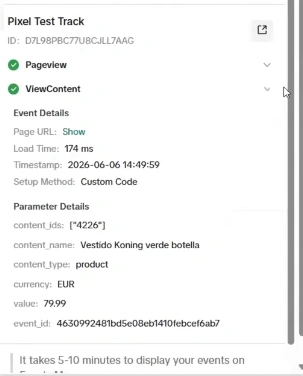 For each step, open the Pixel Helper panel and verify which events fired and what parameters they carried. The most common finding is that the AddToCart event simply does not appear in the Pixel Helper output after clicking the add-to-cart button — confirming the AJAX tracking gap. If AddToCart does appear, inspect the parameters: content_id, content_type, value, currency, and quantity should all be present with correct values matching the product you added.
TikTok Events Manager provides a second diagnostic layer through its event quality scoring and parameter coverage reports. Navigate to your pixel’s data review section and examine the parameter fill rates for each event type. A well-instrumented implementation should show near-100% fill rates for content_id, value, and currency on ViewContent, AddToCart, and InitiateCheckout events. Fill rates below 80% for these parameters indicate systematic extraction failures — the events are firing but without the structured data TikTok needs. Also examine the event volume ratios: in a healthy ecommerce funnel, you should expect roughly 10 to 20 ViewContent events per AddToCart, 2 to 5 AddToCart events per InitiateCheckout, and 2 to 4 InitiateCheckout events per Purchase. Significant deviations from these ratios — particularly near-zero AddToCart relative to ViewContent — are diagnostic of the AJAX gap or server-side-only firing.
Network-level inspection using Chrome DevTools provides the deepest diagnostic layer and is essential for confirming event_id deduplication behavior when both browser pixel and Events API are in use. Open the Network panel, filter for requests to analytics.tiktok.com, and replay each funnel step. For each expected event, verify that a network request fires with the correct event name in the payload, that the event_id field is present and unique per event occurrence, and that the parameters object contains properly structured content data. A missing network request after the add-to-cart click is definitive confirmation of the AJAX tracking gap. An event_id that is absent or identical across multiple events indicates that server-side Events API deduplication will fail, potentially causing double-counting in Events Manager that distorts reported conversion volumes.
Summarizing these inspection steps across your three diagnostic layers reveals five primary findings to watch for:
- Pixel Helper showing no AddToCart after button click: AJAX gap confirmed, server-side hook is not injecting client-side pixel call.
- Events Manager parameter fill rate below 80% for content_id on ViewContent: product object not being queried at hook execution, likely URL-based inference.
- InitiateCheckout volume greater than Purchase volume by a factor of more than 5: check for duplicate firing on checkout step transitions.
- Network tab showing no analytics.tiktok.com request after cart interaction: client-side pixel code is not executing in the AJAX callback.
- event_id missing from browser pixel requests: deduplication against Events API will fail, Purchase events will be double-counted, reported ROAS will be artificially inflated.
The ROAS Distortion Effect: How Incomplete Tracking Corrupts Campaign Performance Data
 The consequences of mid-funnel tracking gaps extend beyond the optimization algorithm into the reported performance metrics that PrestaShop advertisers use to make budget and creative decisions. Incomplete event coverage does not just reduce optimization efficiency — it actively distorts the ROAS figures and funnel metrics that inform every campaign management decision, creating a measurement environment where the data appears to tell a coherent story while being systematically misleading.
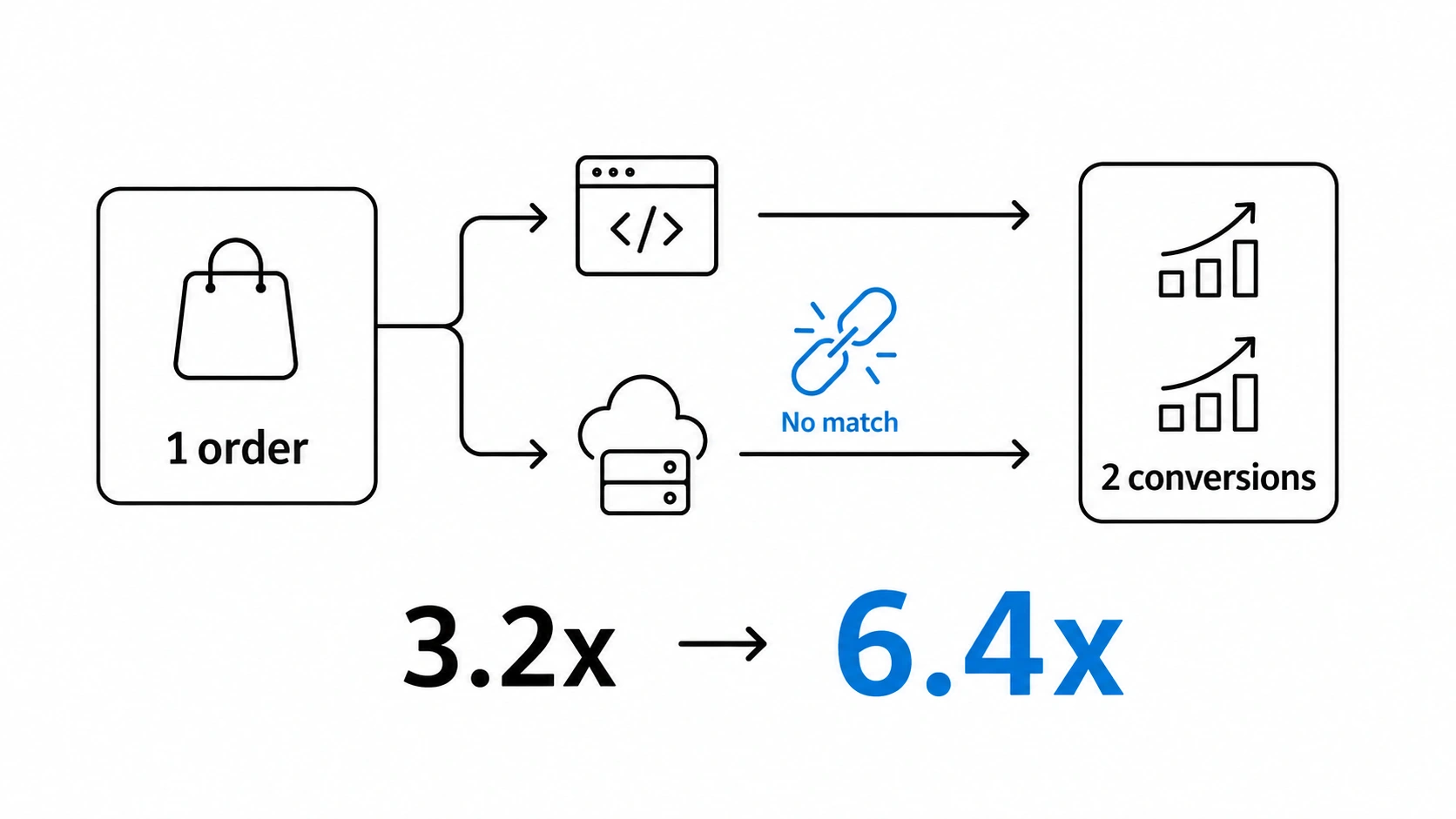
The most common measurement distortion is artificially inflated ROAS caused by Purchase event double-counting. This occurs when a PrestaShop store implements both the browser-side TikTok pixel and the server-side Events API without correct event_id deduplication. The browser pixel fires a Purchase event when the confirmation page loads. The server-side Events API also sends a Purchase event triggered by the actionValidateOrder hook. If event_id values are not synchronized between the two — which requires deliberate implementation, not just installing both integrations independently — TikTok counts two Purchase conversions for every one actual transaction. A campaign generating a true ROAS of 3.2x appears to deliver 6.4x. Budget decisions made on that figure will over-invest in campaigns that are actually marginal performers, and the distortion compounds over time as scaling decisions amplify the effect.
The inverse distortion — deflated apparent performance due to missing mid-funnel attribution — is subtler but equally damaging. When AddToCart and InitiateCheckout events are absent, TikTok cannot attribute assisted conversions that occurred across sessions or devices. A shopper who saw a TikTok ad, added to cart on mobile, and completed purchase on desktop two days later may not be attributed to the TikTok campaign at all if the mid-funnel events that would have anchored the behavioral sequence in TikTok’s attribution model were never tracked. The campaign appears to have generated fewer conversions than it actually influenced, leading advertisers to undervalue TikTok as a channel and reduce budgets that were actually driving incremental revenue.
The data mismatch between PrestaShop’s back-office order reports and TikTok Events Manager conversion counts is itself a diagnostic signal that most advertisers misread. A common finding is that TikTok reports more conversions than the PrestaShop back office for the same time period — which is almost always a sign of double-counting from missing deduplication — or significantly fewer conversions, which points to a combination of attribution window misalignment and missing mid-funnel engagement signals that would have connected TikTok ad exposure to eventual purchase. Neither mismatch is benign. Both indicate a tracking architecture that is generating data that cannot be trusted for optimization or measurement.
In conclusion, the consequences of incomplete tracking on PrestaShop come down to four major impacts:
- TikTok-reported conversions greater than PrestaShop back-office orders: Purchase double-counting due to missing event_id deduplication between pixel and Events API.
- TikTok-reported conversions significantly fewer than back-office orders: attribution signal loss from absent mid-funnel events breaking cross-session and cross-device conversion paths.
- ROAS figures that do not correlate with changes in creative, bid, or audience: optimization model operating on corrupt or insufficient data, making allocation decisions based on noise rather than genuine performance signals.
- Funnel drop-off rates in TikTok reporting that contradict actual PrestaShop analytics: likely caused by missing AddToCart and InitiateCheckout events creating artificial gaps in the reported conversion funnel.
The Complete Fix: Full 5-Event Coverage, Correct Parameters, and Synchronized Event_ID Deduplication
 Solving PrestaShop’s mid-funnel tracking gap requires addressing three distinct technical layers simultaneously: client-side pixel reliability for events that depend on AJAX interactions, server-side Events API coverage for resilient signal delivery, and synchronized event_id deduplication that prevents double-counting when both layers fire for the same user action. Patching any single layer in isolation produces a different set of problems. Only a solution that handles all three layers correctly produces tracking data that TikTok’s algorithm can actually use for optimization.
The client-side layer must be instrumented to capture AJAX-driven interactions — specifically, the add-to-cart action in PrestaShop themes that use a cart drawer or mini-cart. This requires binding JavaScript event listeners to the cart controller’s AJAX response callbacks, not to page-load hooks. When a shopper clicks the add-to-cart button, the pixel call must execute inside the AJAX success handler, after the cart update has completed, with product data passed directly from the response payload. This is the only architecture that reliably captures AddToCart across PrestaShop’s default Hummingbird theme and the commercial themes that replicate its AJAX pattern.
The server-side layer — TikTok’s Events API — provides a parallel, browser-independent signal path that survives ad blockers, browser privacy restrictions, and ITP limitations that increasingly suppress client-side pixel data. The Events API receives the same five events — Pageview, ViewContent, AddToCart, InitiateCheckout, and Purchase — with the full required parameter set: content_id matched to the PrestaShop catalog ID, content_name from the product object, value extracted from the server-side price computation (ensuring VAT alignment and currency correctness), and currency from the active store context rather than client-side JavaScript globals.
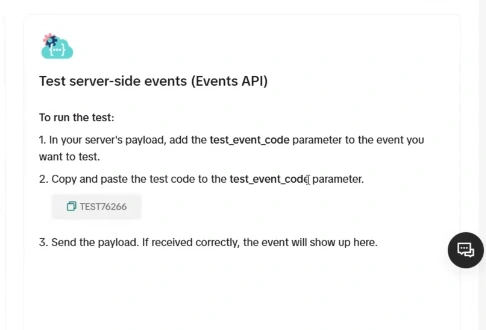
The deduplication mechanism is the critical connector between both layers. TikTok’s deduplication logic matches browser pixel events against Events API events using a shared event_id within a defined matching window. This means both the client-side pixel call and the server-side API request for the same user action must carry an identical event_id — a unique identifier generated once per event occurrence and passed through both paths. Without this synchronization, TikTok counts each signal as a distinct conversion, inflating reported Purchase volumes and corrupting every downstream ROAS and attribution metric.
To achieve full technical alignment across these three layers, a complete tracking architecture must correctly execute five core funnel events:
- Pageview: fires on every page load via browser pixel and Events API, with page URL and referrer parameters correctly populated.
- ViewContent: fires on product page load with content_id from the PrestaShop product object, content_name, value at the displayed price, and currency from the active store context — never inferred from URL patterns.
- AddToCart: fires inside the AJAX response handler on the client side and simultaneously via Events API on the server side, both carrying the same event_id, with quantity, value, and content_id extracted from the cart update response.
- InitiateCheckout: fires once on initial checkout controller load — not on subsequent step transitions — with cart value and currency populated from the server-side cart object.
- Purchase: fires on order confirmation with the complete transaction payload including order_id, value, currency, and content_ids for all purchased items, deduplicated across pixel and Events API using the shared event_id.
Remember, Pixel Track TikTok is a PrestaShop module purpose-built to implement this architecture correctly across PrestaShop 1.7, 8.0, 8.1, and 8.2. It handles the AJAX cart binding, the Events API integration, the server-side parameter extraction from PrestaShop’s native product and order objects, and the shared event_id generation and synchronization across both tracking layers — so every event that TikTok’s algorithm needs to build an accurate optimization model is present, correctly parameterized, and properly deduplicated.
Conclusion: Your TikTok Algorithm Is Only as Smart as the Data You Feed It
 Partial event coverage is not a minor configuration oversight — it is a structural failure that corrupts your optimization foundation from the ground up. When ViewContent, AddToCart, and InitiateCheckout signals are absent from your TikTok tracking implementation, the algorithm is forced to operate on a fragment of the behavioral data it was designed to consume. The result is campaigns that never exit the learning phase, ROAS figures that are either inflated by double-counting or deflated by attribution loss, and budget decisions made against metrics that do not reflect reality.
The PrestaShop-specific failure modes are well-understood: AJAX cart drawers that bypass server-side hooks, InitiateCheckout events bound to the wrong lifecycle point, ViewContent events that fire without valid content_id values, and Purchase events double-counted across browser pixel and Events API due to missing event_id deduplication. None of these problems are inevitable — they are the predictable consequence of generic implementations that were never built to handle PrestaShop’s architecture correctly.
The fix is a complete, correctly parameterized 5-event implementation with synchronized event_id deduplication across both tracking layers. Pixel Track TikTok is built specifically to deliver exactly that for PrestaShop 1.7, 8.0, 8.1, and 8.2 stores. If your campaigns are underperforming and your mid-funnel events are missing, the diagnosis is clear — and so is the solution. Visit pixeltracktiktok.com to restore the full optimization signal your TikTok campaigns depend on.