

International TikTok campaigns can appear catastrophically unprofitable—or implausibly profitable—when the purchase value sent by a PrestaShop store is not paired with the correct currency and machine-readable numeric format. A €100 order may arrive in TikTok Ads Manager as 100 USD rather than being converted from EUR into the ad account’s billing currency. The nominal number is correct, but its unit is wrong; that distinction is enough to corrupt revenue reporting, ROAS calculations, and campaign-level value comparisons across markets.
The distortion becomes far more severe with currencies that have materially different denominations. A Japanese order worth ¥10,000 can be interpreted as 10,000 USD if JPY is missing or incorrectly replaced by the account currency. Conversely, formatting or parsing errors can reduce a high-value order to 0, 1, or a truncated partial amount. These are not cosmetic reporting defects: TikTok’s automated delivery systems use received conversion values as optimization signals.
When Purchase events carry inconsistent values or currencies, Value-Based Optimization (VBO) is trained on corrupted economics. TikTok can then prioritize users who appear likely to generate inflated “revenue,” suppress traffic that is genuinely valuable but underreported, and calculate ROAS against a value stream that no longer represents settled order totals. In PrestaShop, the root cause is frequently the boundary between localized storefront display formatting, customer currency selection, and the payload emitted by the browser pixel or server-side Events API.
How TikTok Normalizes Event Currency and ISO 4217 Codes

TikTok must receive two separate pieces of monetary data for a value-bearing conversion such as Purchase: a numeric value and a currency code. The event currency describes the unit in which the transaction was completed; the TikTok Ads account currency is the billing and reporting unit configured for the ad account. They are not interchangeable. A French storefront can legitimately send value: 100.00 with currency: “EUR” while the advertiser’s TikTok ad account is denominated in USD. TikTok’s conversion and reporting systems use the event currency to normalize the conversion value into the account currency for comparable reporting and value-based delivery.
The currency parameter should use an ISO 4217 alphabetic code (exactly three letters, uppercase) and must describe the same monetary unit used to calculate value, not the visitor’s locale, browser language, shipping country, or a PrestaShop display preference. For example, an order charged in GBP for delivery to Germany is still a GBP transaction and must be transmitted as currency: “GBP”.
Normalization depends on that pairing being correct. If a EUR purchase is transmitted as USD, TikTok has no reliable basis to apply EUR-to-USD conversion because the payload explicitly claims the value is already in USD. The result is a false 1:1 interpretation of the nominal amount. This creates systematic ROAS bias: EUR values can be understated or overstated relative to USD, while JPY, KRW, and other high-denomination currencies can create errors by orders of magnitude when mislabeled as USD or EUR.
An omitted, lowercase, malformed, or mismatched currency field is an event-schema defect, not a harmless formatting variation. Do not assume TikTok will infer a transaction currency from the pixel’s page URL, customer location, catalog feed, or ad account settings. Depending on the integration path, the event can be rejected, processed without dependable value normalization, or attributed using a wrong currency interpretation. Use uppercase ISO 4217 codes at the point where the final PrestaShop order currency and paid total are known, and ensure the browser Pixel and Events API implementations send the identical value/currency pair for the same transaction.
String Formatting Bugs: Symbols, Comma Decimals, and Zero-Decimal Currencies

The value field is data, not a storefront price label. TikTok conversion payloads require a machine-readable numeric amount using a period (.) as the decimal separator, without grouping characters or currency symbols. A customer-facing PrestaShop price such as 1.299,50 € is correct for many European locales, but it is not a safe event value. The corresponding tracking value must be 1299.50, sent separately from currency: “EUR”. Passing a formatted presentation string into a pixel call or Events API body crosses localization logic into a field intended for arithmetic.
Currency symbols create severe parsing failure modes. Values such as €1299.50, 1,299.50 USD, £ 99.99, or $1,299.50 are display strings, not numeric values. JavaScript coercion, template escaping, middleware serialization, and server-side validation can each handle such strings differently. Some paths may reject the value; others may parse only an initial numeric fragment, stop at a separator, or serialize an unexpected value. The durable implementation is to submit a clean number (e.g., 1299.50) rather than any localized or symbol-bearing string.
Comma-decimal locales are especially dangerous because the same character has conflicting meanings across regions. In 1.299,50, the period is a thousands separator and the comma is the decimal separator; in TikTok-compatible machine formatting, 1299.50 uses no thousands separator and a period decimal. Naively removing commas can turn 1.299,50 into 1.29950, while replacing commas with periods without removing grouping separators can produce 1.299.50, which is not a valid decimal representation. Any of these defects sends a value that is materially different from the paid order total.
Zero-decimal currencies require an additional distinction between currency precision and numeric validity. JPY amounts are ordinarily represented as whole yen: a ¥10,000 order should be sent as value: 10000 and currency: “JPY”, not as ¥10,000, 10,000, or an amount incorrectly divided by 100 to mimic a two-decimal currency. PrestaShop modules, payment gateways, and custom tracking code may store amounts in decimal, minor-unit integer, or display-formatted forms; mixing those representations can multiply or divide values by 100 or 1,000. Such outliers do more than skew a dashboard: they warp the purchase-value distribution that TikTok uses for automated bidding and VBO.
Diagnosing Currency and Value Discrepancies in TikTok Events Manager and Ads Reporting

In TikTok Events Manager, begin with a controlled Purchase test rather than comparing aggregated dashboard totals. Use Test Events, event detail views where available, and the browser Network panel to inspect the actual Pixel request or Events API body sent for each transaction. Verify that properties.currency is a three-letter uppercase ISO 4217 code (such as USD, EUR, or JPY) and that properties.value is a JSON number, not a locale-formatted string. A valid conceptual payload is {“event”:”Purchase”,”properties”:{“currency”:”EUR”,”value”:149.00,”contents”:[…]}}; an apparently similar payload containing “value”:”149,00″, “value”:”€149.00″, or an absent currency field is not equivalent. Reconcile the payload against the order record using the order reference or a deterministic event_id, separating implementation defects from TikTok’s reporting conversion.
In Ads Manager, validate the meaning and currency basis of every value column before declaring a tracking discrepancy. Configure reporting columns explicitly and compare Purchase count, Total Purchase Value, and Conversion Value (Local). A local conversion-value column generally represents the value associated with the conversion event in its submitted currency context, whereas spend, ROAS, and optimization totals are normalized into the ad account’s billing currency using platform exchange rates. Therefore, a EUR event can differ from its USD reported value without being broken. The diagnostic signal is not a small exchange-rate deviation; it is a pattern such as all JPY orders appearing numerically identical in a USD report, missing values, or values inflated by 100x or 1,000x.
Treat Chrome DevTools as the source of truth for what the browser actually emitted. Inspect the JavaScript object immediately before ttq.track(‘Purchase’, …) to catch template escaping and JavaScript coercion defects: value: “149.00€” caused by appending a currency sign, value: “149,00” from a localized Smarty string, value: NaN after parsing a formatted amount, and value: null when an order variable is unavailable on the confirmation route. Also test currencies with nonstandard presentation rules—such as JPY or comma-decimal locales—because a tag that appears correct for USD can fail for these cases.
Corrupted value outliers disproportionately distort Value-Based Optimization (VBO). Value-Based Optimization learns from the value distribution attached to Purchase events and preferentially seeks auctions predicted to generate higher-value outcomes. If a 15,000 JPY purchase is submitted as value: 15000 with currency: USD, the model can interpret it as a USD 15,000 outlier rather than a ~$100 order. Conversely, a valid high-value order sent as null, NaN, or a truncated localized number removes useful value signal. A small number of corrupted outliers can distort average order value, value-based audiences, campaign-level ROAS, and budget allocation. Investigate maximum values per currency, flag implausible percentile spikes, and correct source code before modifying campaign budgets.
PrestaShop’s Currency Engine: Context::getContext()->currency, Exchange Rates, and Smarty Variables
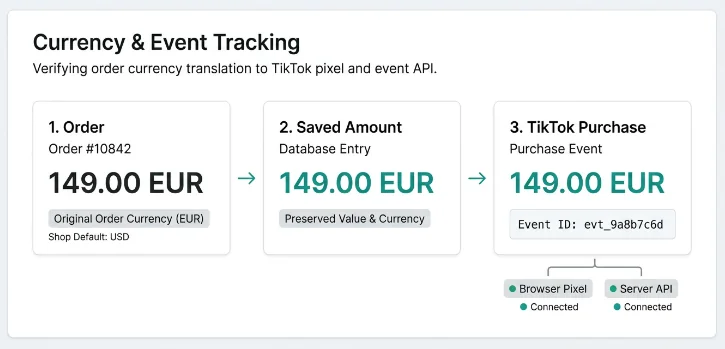
PrestaShop developers must not collapse several distinct currency concepts into one variable. The shop’s default currency is a configuration-level fallback used for catalog and administrative behavior, while the active customer/cart currency is normally represented by the cart’s id_currency. In front-office controller code, Context::getContext()->currency exposes the active Currency object for the current request, and Context::getContext()->cart->id_currency identifies the currency assigned to the cart. At order creation, the order persists its own id_currency and monetary totals; for a completed Purchase event, the order record is the authoritative transaction artifact, not whichever currency happens to be active in a later page request. A confirmation page can be rendered after context restoration, redirects, payment callbacks, or module overrides, so reading only the default currency or a loosely scoped context currency can produce the wrong signal.
A recurring implementation failure is to send a display value instead of a transactional value. PrestaShop display helpers and Smarty output are intentionally localized: {Tools::displayPrice($total)} and equivalent formatted price variables may include a currency sign, translated placement, HTML markup, non-breaking spaces, thousands separators, and locale-specific decimal separators. They are appropriate for checkout UI, but they must never be inserted directly into a JavaScript or Events API numeric field. A tracking integration should obtain the paid order amount from a raw monetary field, typically (float) $order->total_paid_tax_incl, and emit it as a JSON number through a proper encoder like json_encode. Currency should be derived from the order’s id_currency by loading the corresponding Currency object and using its ISO code, rather than scraping a Smarty currency symbol. The resulting client-side contract should resemble ttq.track(‘Purchase’, {value: 149.00, currency: ‘EUR’}), with the amount and ISO code serialized independently.
Browser-side and server-side tracking must use the same order-level currency source. A browser tag that reads the default shop currency or Context::getContext()->currency can emit USD while the order was actually authorized and recorded in EUR; the inverse is also possible when a payment flow returns to a storefront whose context has switched or reset. This is especially common around PayPal, Stripe-hosted payment pages, asynchronous payment validation, and redirects across localized domains. A server-side Events API worker that sends $order->total_paid_tax_incl together with the order’s currency can then disagree with a browser Pixel reading session currency, creating two Purchase events with conflicting values. Implement a canonical event builder keyed by order ID/reference, source both browser and server payloads from the persisted order currency and order total, and use a stable shared event_id so TikTok can deduplicate Pixel and Events API copies.
Multi-store and multi-domain deployments add another failure boundary because Context is request-scoped and can be reconstructed differently in each controller, cron process, webhook endpoint, or domain. A payment module may validate an order under one shop context, redirect a customer to another host, and render a success template whose assigned Smarty variables come from the destination shop’s default currency. Custom modules also frequently pass only a formatted total between controllers, omit id_currency from redirect parameters, or overwrite a previously correct currency variable with Context::getContext()->currency after cart restoration. Server callbacks are even more exposed: they may execute without the customer’s cookie and therefore have no active front-office currency at all. Pass the order identifier, load the persisted Order and its id_currency inside the final tracking handler, resolve the ISO 4217 code from that record, and log the shop ID, order ID, cart currency, order currency, emitted value, and emitted currency for every Purchase. That audit trail makes cross-shop overwrites and controller-boundary data loss observable instead of silently appearing as a TikTok ROAS anomaly.
The Robust Architecture: Canonical Raw Values, ISO 4217 Validation, and Dual-Layer Events API Synchronization
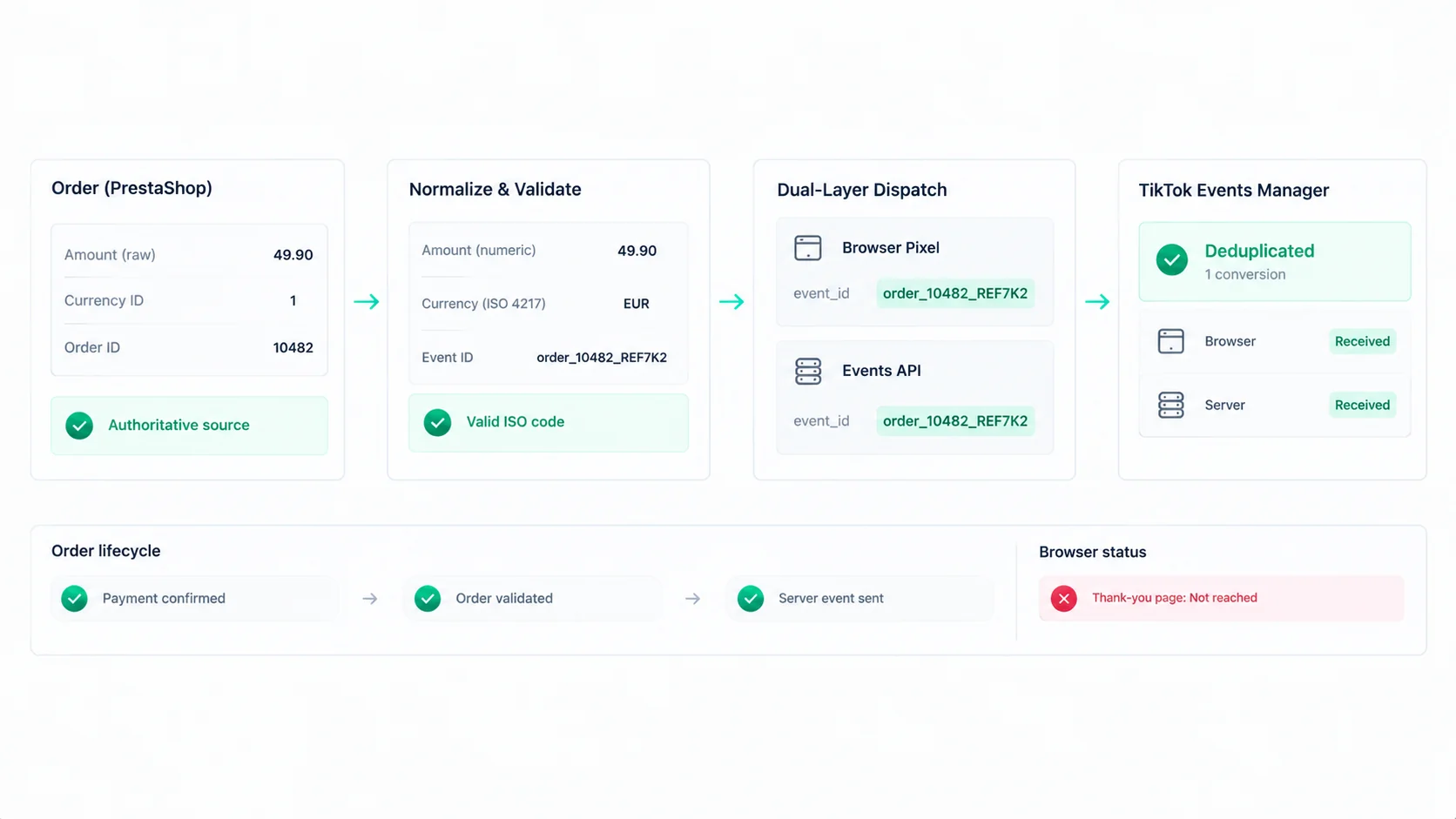
A reliable TikTok tracking implementation must begin with authoritative monetary data, not presentation-layer output. On an order-confirmation event, the tracking service should read the persisted order entity—for example, Order::$total_paid_tax_incl—and, where cart or product payloads are required, retrieve raw fields such as price_amount. Do not scrape a DOM node, reuse Tools::displayPrice() output, parse an invoice string, or trust a JavaScript variable populated from a localized template. Those layers contain currency symbols, non-breaking spaces, grouping separators, or client-side currency conversions. The database-backed amount associated with the completed order and its id_currency is the auditable source of truth.
Normalize that source value in one shared service before any TikTok payload is built. Cast the raw amount to a numeric type, apply deterministic rounding, and serialize a non-localized decimal value: ordinarily two decimal places, but zero fractional places for zero-decimal ISO 4217 currencies such as JPY and KRW. The currency must be resolved from the order or cart currency ID through Currency::getIsoCodeById($idCurrency), normalized to uppercase, and validated as a three-letter ISO 4217 code before dispatch. A symbol, locale, language, country, or shop default currency is not an acceptable substitute. Invalid or missing ISO data should fail closed in tracking logs and trigger operational alerting.
The normalized purchase object must feed both transport layers. Generate one stable event_id per conversion—ideally deterministically associated with the order and protected from repeat confirmation-page loads—and send matching event_id, event, value, and currency fields in the browser Pixel and server-side TikTok Events API payloads. The browser event provides client context while Events API supplies resilient server-side delivery, but neither layer may independently recalculate or reformat the amount. Mismatched payloads create unreliable deduplication, attribution, and value reporting.
Pixel Track TikTok provides this multi-currency-aware architecture for PrestaShop 1.7 through 8.2 out of the box. It automatically formats values according to currency precision, validates ISO 4217 currency codes, and synchronizes browser Pixel and TikTok Events API purchase data, including aligned event identity and value/currency fields. This removes template-parsing and dual-payload inconsistencies, helping preserve accurate ROAS across storefront currencies.
Conclusion: Protecting Value-Based Optimization Economics

International campaigns cannot be optimized safely when the purchase value arriving in TikTok is a formatted storefront string, an incorrectly converted amount, or a value paired with the wrong currency. Those errors directly corrupt reported ROAS and feed bad economics into Value-Based Optimization: high-value markets can look unprofitable, low-value or zero-decimal currencies can appear massively inflated, and TikTok can learn toward the wrong audiences, bids, and placements.
The durable fix is architectural rather than cosmetic: use authoritative PrestaShop monetary fields, normalize numeric values according to the ISO 4217 minor-unit rules, transmit an explicit ISO currency code, and keep browser Pixel and Events API purchase payloads identical under one shared event_id. For PrestaShop merchants operating across currencies, install Pixel Track TikTok at pixeltracktiktok.com to implement multi-currency-aware TikTok tracking and protect the purchase-value signal used for ROAS reporting and VBO.