
A common but difficult-to-diagnose PrestaShop tracking failure appears when traffic, product engagement, and even visible cart activity remain healthy, yet TikTok Ads campaigns plateau. Store owners may see strong landing-page visits and credible product-page sessions in analytics, while TikTok Events Manager records far fewer ViewContent and AddToCart events than the storefront actually generates. The result is often a rising Purchase CPA, inconsistent delivery, and campaigns that appear unable to scale despite adequate budget, creative volume, and catalog demand.
The underlying issue is frequently not the TikTok Pixel itself, but the way modern PrestaShop themes handle cart interactions. Many themes use AJAX add-to-cart requests and slide-out cart drawers rather than redirecting shoppers to a cart page or reloading the current product page. The shopper experiences an immediate cart update, but the browser may never execute the page-load tracking logic that legacy pixel integrations depend on. If the event is not explicitly dispatched when the asynchronous action succeeds, TikTok receives no reliable indication that the user added an item to the cart.
This creates a critical mid-funnel measurement gap. TikTok can observe an ad click and, in some implementations, a purchase, but it loses the behavioral steps that connect product interest to transaction intent. When ViewContent and AddToCart are missing, delayed, duplicated, or materially underreported, the platform has less evidence for identifying high-propensity shoppers. The issue is therefore both a technical instrumentation problem and a media-performance problem: incomplete frontend event capture directly weakens optimization quality.
How AJAX Cart Drawers Decouple DOM Updates From Page Triggers
Traditional browser-side tracking assumes that meaningful ecommerce actions align with navigations or predictable lifecycle moments such as document ready, window load, a product-form submit, or a cart-page render. AJAX cart drawers break that assumption. After a shopper clicks an add-to-cart button, the theme commonly intercepts the action, prevents the browser’s default form navigation, serializes product attributes and quantity, and sends an asynchronous HTTP request to a PrestaShop cart endpoint. Once the response returns, JavaScript updates the mini-cart count, cart totals, drawer markup, and accessibility state without replacing the document. The visual confirmation that users see is therefore a DOM mutation, not proof that a new page has loaded or that a TikTok AddToCart call has occurred.
The exact implementation differs by theme and PrestaShop version. A legacy theme may issue a jQuery $.ajax() or $.post() request and then replace fragments of the cart interface; a newer implementation may use fetch(), XMLHttpRequest, Promises, custom modules, or a framework-level state store. In each case, the successful network response is the authoritative point at which the frontend can determine whether the requested product, combination, quantity, and price were accepted by the cart. A tracking implementation that only reads static markup on initial page render cannot reliably observe this state transition. It may inspect the product page correctly but never execute again after the cart drawer is populated asynchronously.
PrestaShop-specific integrations often rely on events such as prestashop:updateCart, or on theme hooks that are expected to run when the cart changes. That can be useful only if the active theme actually emits the event, emits it after a successful cart response, and preserves a payload containing usable product data. Custom cart drawers frequently bypass, rename, scope, or inconsistently trigger those conventions. A listener attached too late can miss an early dispatch; a listener expecting a jQuery event can miss a native CustomEvent; and a handler that assumes event.reason or event.resp contains a product object may fail silently when a theme returns only rendered HTML or a minimal JSON structure. Likewise, scripts bound to window.onload, DOMContentLoaded, or a document-level click handler do not automatically capture cart changes completed inside a component callback.
Document-level listeners are especially vulnerable when dynamic frontend code stops propagation, replaces the original button node, uses delegated handlers inside an isolated component, or triggers cart behavior from quick-view modals, product carousels, sticky purchase bars, and cross-sell widgets. A generic click listener may fire before the AJAX request succeeds, causing false AddToCart events for failed requests; alternatively, it may not fire at all for programmatic cart additions. The durable technical distinction is between intent and confirmed state: an AddToCart event should be associated with a successful asynchronous cart mutation, using the product and value data returned or validated at that point. Without an explicit bridge between the AJAX success path and the TikTok event dispatcher, the cart drawer can update perfectly for the shopper while the advertising platform receives no mid-funnel signal.
How Missing Mid-Funnel Events Weakens TikTok Optimization
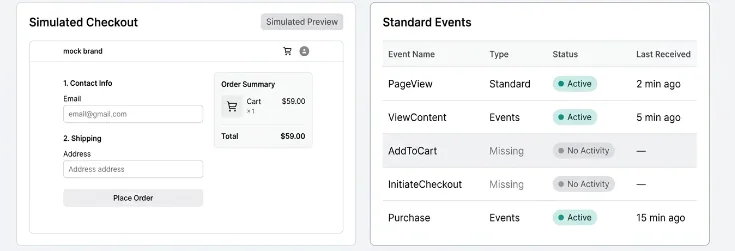
TikTok’s delivery systems do not optimize from purchases alone in every auction. TikTok Events Manager receives event sequences—such as PageView, ViewContent, AddToCart, InitiateCheckout, and Purchase—that help the platform estimate a user’s likelihood of progressing toward the campaign objective. Mid-funnel events provide substantially more volume than purchases for most stores and reveal commercial intent earlier in the journey. When event names, timestamps, values, currencies, content identifiers, and user-matching parameters are captured consistently, TikTok can use those observations to train propensity models, evaluate creative and audience combinations, and allocate impressions toward users with a higher probability of converting.
When AddToCart is absent or materially underreported, TikTok sees an artificially abbreviated funnel. Users who view a product and place it in the cart may appear indistinguishable from users who merely bounced after browsing. The platform loses a high-intent label that would normally connect product engagement with eventual purchase behavior. This reduces the amount of usable optimization feedback between the click and the conversion, particularly for stores with low daily purchase volume, longer consideration cycles, higher average order values, or campaigns entering new audiences. Smart Performance Campaigns are especially sensitive to the completeness of this feedback because automated targeting, placement selection, and budget allocation depend on observed conversion patterns rather than manually constrained audience assumptions.
The practical consequence is often a Purchase CPA increase even when the store’s real onsite conversion behavior has not deteriorated. TikTok may continue spending on traffic that produces page views, but it has less evidence to distinguish sessions that develop into meaningful commercial intent. Purchase events arrive later and less frequently than AddToCart events, so they provide a sparse and delayed training signal. This can make delivery volatile: the system may overreact to small clusters of purchases, struggle to validate new creative, narrow toward previously known pockets of users, or fail to exit the learning phase efficiently. A campaign can therefore appear to have an audience or creative problem when its actual limitation is incomplete event instrumentation.
Event quality compounds the issue. Low event match quality—caused by missing or inconsistent identifiers, incomplete advanced matching data, mismatched external IDs, or weak browser/server event correlation—reduces TikTok’s ability to associate observed actions with ad-exposed users. Signal latency has a similar effect: if an AddToCart is sent seconds or minutes late because the implementation waits for an unrelated page action, the event is less useful for timely attribution and optimization. Missing events, delayed events, and events with incomplete ecommerce parameters can each distort funnel reporting in Events Manager. Before interpreting weak Smart Performance Campaign results as a bidding, creative, or product-market-fit failure, advertisers must verify that AJAX-driven product views and cart mutations are being captured as accurate, timely, and matchable TikTok events.
Diagnosing AJAX AddToCart Failures with TikTok Pixel Helper, Chrome DevTools, and Events Manager

Start with a controlled browser-session test rather than relying on aggregate dashboard counts. Open Chrome DevTools before interacting with the store, preserve the Network log, disable cache, and filter requests by analytics.tiktok.com, pixel, event, or POST. Depending on the deployed TikTok web-pixel version, the browser may send requests to a URL such as https://analytics.tiktok.com/api/v2/pixel/…, an events/batch endpoint, or through a first-party/proxy collection URL configured by the integration. Perform Add to Cart from every conversion surface: product detail page, category/listing card, quick-view modal, cart drawer recommendation block, and mobile sticky CTA. For each action, verify that a new POST appears immediately after the cart AJAX request—not merely after a later page navigation. Compare the timing waterfall: the cart endpoint may be controller=cart or a theme/module-specific route, while the TikTok request should follow only after the application has confirmed that the cart mutation succeeded.
Inspect the request payload in DevTools under Network → Payload (or Request). The exact transport envelope varies by Pixel version, but the logical event must resolve to event: “AddToCart” and include a meaningful properties object. At minimum, validate content_id, content_name, value, and ISO 4217 currency; include a unique event_id whenever browser and Events API deduplication is in use. A representative logical payload is {“event”:”AddToCart”,”event_id”:”atc_<uuid>”,”properties”:{“content_id”:”SKU-123″,”content_name”:”Blue Running Shoe”,”value”:79.99,”currency”:”USD”,”quantity”:1}}. Confirm that value is numeric rather than a localized string such as “79,99 €”, that currency is not missing or derived from a translated symbol, and that content_id matches the identifier sent later with ViewContent, InitiateCheckout, and Purchase. A request returning HTTP 200 is necessary but not sufficient: inspect whether consent mode, ad blockers, Content Security Policy, or a malformed payload prevents the event from being accepted and surfaced in Events Manager.
AJAX drawers create timing hazards that page-load implementations do not encounter. A product button can trigger an asynchronous PrestaShop cart request, then immediately open a drawer, re-render button markup, replace modal HTML, or redirect to /cart?action=show; any of those operations can cancel, detach, or outrun a listener that dispatches TikTok only after a DOM mutation. The same failure occurs when code calls location.href immediately after ttq.track(…), especially on slow mobile devices where the browser deprioritizes or aborts pending telemetry during navigation. Bind tracking to the successful cart-update lifecycle—not just the button click—and dispatch once per confirmed cart mutation. In practical terms, listen for the theme’s cart-success event or resolve the AJAX promise first, generate one event_id, send the browser event, and reuse that exact ID for the server-side Events API event. Do not blindly emit on both click and drawer-open, because a single cart addition can then create duplicate AddToCart events.
TikTok Pixel Helper is the fastest first-pass validator because it exposes whether the base pixel initialized and whether an AddToCart call was observed in the current page context. “No Event Detected” after an otherwise successful drawer update usually means the theme bypassed the module’s selector or event hook; it can also indicate that the pixel script was not loaded in the modal/SPA-like interaction path, consent blocked initialization, or a JavaScript exception stopped the handler. Conversely, helper output showing several low-value micro-events—or repeated AddToCart events from one click—often reveals delegated listeners attached more than once after partial DOM refreshes, click tracking plus AJAX-success tracking firing together, or multiple TikTok modules injected through displayHeader. Use Pixel Helper for immediate browser-side evidence, DevTools for raw payload and timing evidence, and TikTok Events Manager’s Test Events/diagnostics view to confirm that TikTok actually received and processed the event stream over the following minutes.
PrestaShop Theme Architectures, Cart Overrides, and Hook Misconfigurations

PrestaShop’s nominal theme structure does not guarantee a standard cart interaction model. In a lightly customized Classic theme, product forms and cart behavior commonly follow core conventions, but custom implementations frequently override templates such as themes/custom/templates/checkout/cart.tpl, product-list partials, quick-view templates, or templates/catalog/_partials/miniatures/product.tpl. They may also replace or extend the JavaScript behavior supplied by modules/ps_shoppingcart/ps_shoppingcart.js. A theme can submit to the normal PrestaShop cart controller while rendering its own off-canvas drawer, or it can intercept the form entirely and use a custom AJAX controller. From a tracking perspective, these are materially different architectures: the same successful cart mutation may no longer originate from a visible .add-to-cart form, and the browser may never perform the full navigation on which an older pixel module depends.
Many generic TikTok integrations are installed through displayHeader, which is appropriate for loading the base pixel but insufficient for guaranteeing conversion-event coverage. The module may inject JavaScript that searches once at DOM ready for .add-to-cart or .ajax_add_to_cart_button, then binds click handlers to the matching elements. That approach fails when a Warehouse, Alysum, Creative Elements, or bespoke theme renames classes, uses <button data-action=”add-to-cart”>, renders forms dynamically, or exposes a modal overlay whose controls are inserted after initial page load. It also fails if the theme stops click propagation, prevents the default submit path, or replaces the target element after every cart update. displayHeader answers “is the TikTok library present?”; it does not answer “did the implementation observe every confirmed cart addition?”
The weak point becomes more visible across multiple storefront surfaces. Category grids may use an AJAX button with product attributes embedded in data-* fields; quick-view modals may create a separate product form with a selected combination; sticky mobile footers may use a dedicated CTA outside the standard product form; and cross-sell widgets inside an open drawer may add a product without returning to a product page at all. A direct listener bound to the initial DOM silently disappears for dynamically injected controls. Delegated document-level click handling can improve coverage, but click alone is still not authoritative: it tracks failed requests, out-of-stock responses, and selector-matched controls that do not alter the cart. The durable pattern is to connect tracking to the cart-success signal emitted after the AJAX response, normalize product/combination/quantity/price data there, and ensure each successful mutation produces exactly one AddToCart event.
The operational symptom is a measurable funnel split: PrestaShop back-office records, cart-controller logs, or analytics tables may show 1,000 successful cart additions during a campaign period while TikTok Events Manager reports only 350 AddToCart events. Before interpreting this as attribution loss, compare equivalent windows, store views, currencies, consent populations, and bot-filtering rules; then segment by entry surface and device type. A common real-store pattern is near-complete coverage on product detail pages, partial coverage on desktop category cards, and severe loss in quick view or mobile drawer flows. That distribution points to a theme integration defect rather than weak buyer intent. Reconcile cart mutations against TikTok event IDs where available, inspect the affected template and JavaScript override chain, and test every custom add-to-cart surface after theme, module, and PrestaShop upgrades.
Robust Architecture: Browser Hooks + TikTok Events API With Shared event_id Deduplication
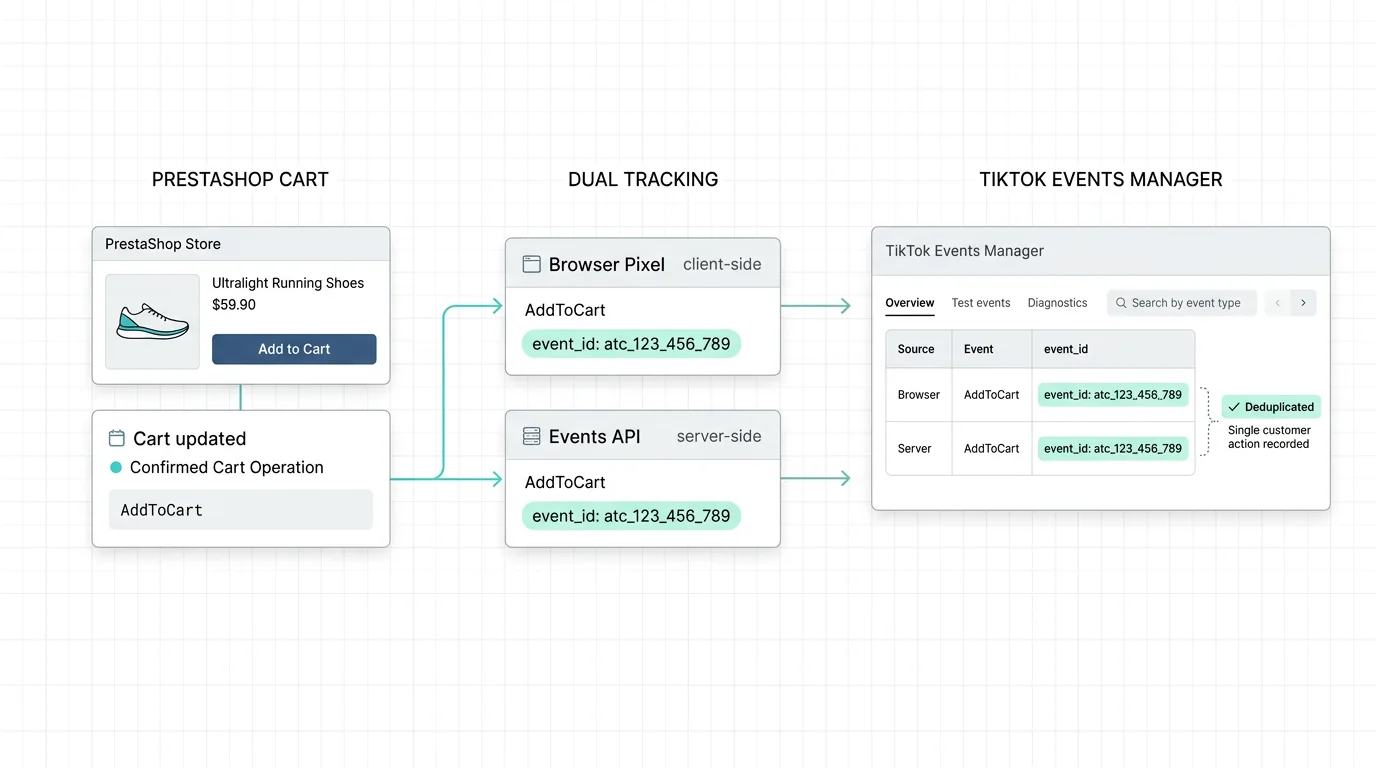
The robust fix is an end-to-end measurement architecture in which the cart mutation—not a theme button click—is the authoritative AddToCart trigger. In PrestaShop, an integration can observe the cart lifecycle at application level, typically around actionCartUpdateQuantityBefore and/or actionCartSave depending on the exact cart flow, module implementation, and PrestaShop version. Once the server has identified a genuine positive quantity addition, it constructs the canonical AddToCart payload and sends it through TikTok Events API. In parallel, the AJAX response, an application event, or a module-managed client-side dispatcher supplies the browser with the same tracking context and calls the TikTok Pixel. This remains reliable whether the action originated from a product page, quick-view modal, product listing, cart drawer, or a custom theme component, because the implementation follows the cart state transition rather than unstable DOM selectors or markup-specific callbacks.
Deduplication depends on one shared event_id for the same logical event delivery. Generate it once on the server at the authoritative cart operation, persist or carry it through the request/response lifecycle, and include that exact value in both the Events API payload and the browser Pixel call. A practical format is atc_{cart_id}_{product_id}_{attribute_id}_{timestamp}; in production, the timestamp must be the single server-generated event timestamp for that operation, not a newly generated client timestamp. If quantity changes, retries, parallel AJAX requests, or repeated UI interactions are possible, the identifier should also be designed around the actual cart-operation identity so distinct additions do not collapse into one event. TikTok can then recognize the browser and server records as duplicate representations of the same AddToCart and deduplicate them within its 48-hour deduplication window, while preserving the resilience of server-side delivery when browser execution is blocked, delayed, or interrupted.
The same payload discipline should apply across the complete funnel: PageView, ViewContent, AddToCart, InitiateCheckout, and Purchase. At minimum, consistently provide content_id, content_name, value, currency, and event_id; production implementations should also maintain accurate content type, quantity where applicable, product/variant mapping, order identifiers for Purchase, event time, source URL, and permitted first-party matching data for Events API. The important engineering rule is parity: the browser and server versions of a given event must describe the same product or order, monetary value, currency, and shared identifier. That gives TikTok a clean path from product interest to cart intent to checkout and completed revenue, rather than forcing optimization models to infer a missing middle of the funnel.
Pixel Track TikTok provides this dual-layer architecture natively: resilient browser Pixel dispatch, server-side TikTok Events API delivery, shared-event deduplication, and full-funnel event coverage without theme code overrides. Its turnkey PrestaShop integration is compatible across PrestaShop 1.7, 8.0, 8.1, and 8.2, reducing the operational risk of maintaining selector-dependent snippets through theme changes, AJAX drawer upgrades, and platform updates.
Conclusion: Scale TikTok Ads With Clean, Complete Funnel Data

AJAX cart drawers are not inherently incompatible with TikTok Ads measurement; the failure occurs when tracking is attached to transient theme markup instead of to the authoritative cart mutation. A selector-based click listener may work on a traditional product page and silently fail when a quick-add modal, mini-cart, or asynchronous drawer replaces the DOM. The result is an especially dangerous measurement gap: ViewContent and Purchase may still appear, while AddToCart—the key mid-funnel optimization signal—disappears.
The durable pattern is to treat PrestaShop’s server-side cart lifecycle as the source of truth, pair it with a browser dispatch that is independent of fragile theme selectors, and deduplicate both deliveries with one shared event_id. With PageView, ViewContent, AddToCart, InitiateCheckout, and Purchase consistently enriched, TikTok receives a coherent funnel rather than a collection of disconnected events.
Do not scale TikTok campaigns on blind mid-funnel data. Install Pixel Track TikTok at https://pixeltracktiktok.com/ to deploy dual-layer Pixel plus Events API tracking for PrestaShop without maintaining theme-specific tracking overrides, then validate every core event in TikTok Events Manager and browser/server diagnostics before increasing spend.