

Every conversion event your TikTok pixel fires is a signal — a data point that tells TikTok’s algorithm who bought something, how much they spent, and which creative drove the decision. When those signals are accurate, TikTok’s bidding engine learns efficiently, allocates budget toward high-intent audiences, and reports ROAS that reflects reality. When those signals are duplicated, the entire optimization loop breaks. A single purchase becomes two purchases. A single add-to-cart becomes two. The algorithm trains on inflated data, and the performance numbers you see in Ads Manager become structurally unreliable.
Duplicate event firing is one of the most common and most damaging tracking problems in TikTok advertising, and it is disproportionately prevalent on PrestaShop stores. The architecture of PrestaShop, combined with the way most merchants implement tracking (a native pixel snippet in the theme, a tracking module, and sometimes a Tag Manager container all running simultaneously), creates multiple code paths that can each independently fire the same event to TikTok. Layer on top of that the TikTok Events API, which is designed to complement browser-side tracking but requires a specific shared event_id to tell TikTok “this server event and this browser event represent the same conversion” — and if that event_id is missing or inconsistent, TikTok has no mechanism to deduplicate them. It counts every hit as unique.
This article is a technical deep-dive into exactly how duplicate events originate on PrestaShop, how TikTok’s own tooling exposes the problem, and what the downstream consequences are for your campaign bidding, optimization signals, and reported ROAS. If you are running TikTok Ads on a PrestaShop store and have ever wondered why your cost-per-purchase in TikTok looks suspiciously low or your Events Manager shows a deduplication warning, this is the root-cause analysis you need.
How Duplicate TikTok Events Actually Happen on PrestaShop
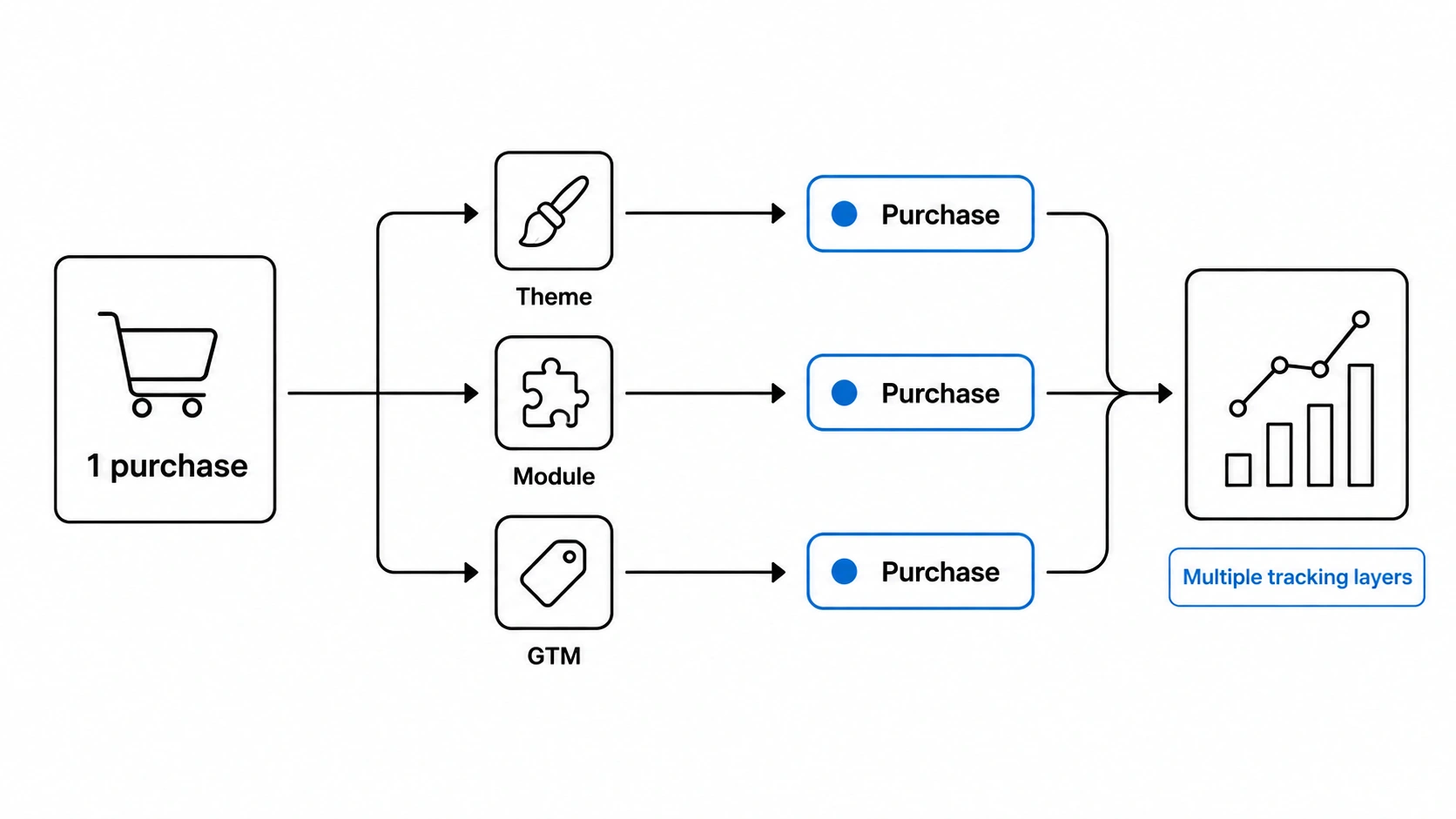 Duplicate event firing is rarely the result of a single mistake. It is almost always the product of multiple tracking layers operating independently, each unaware of the others — a structural problem that emerges from the way PrestaShop stores accumulate tracking implementations over time. Understanding the specific mechanisms requires looking at each code path individually.
The most common scenario is a browser pixel combined with a server-side Events API call, both firing for the same conversion event, without a shared event_id. This is the architectural pattern TikTok explicitly designed deduplication for: you fire a Purchase event from the browser (via the pixel base code on the order confirmation page) and simultaneously send a Purchase event from your server (via the Events API, triggered by a PrestaShop hook like actionOrderStatusUpdate or actionValidateOrder). TikTok’s deduplication logic works by matching events that share the same event_id value across both channels within a short time window. If the browser event sends a randomly generated event_id — or no event_id at all — and the server event sends a different one, TikTok cannot recognize them as the same conversion. Both events are ingested as distinct purchases.
A second common source of duplication is theme re-rendering and AJAX navigation. PrestaShop themes built on the Symfony/Prestashop UI Kit stack or heavily customized themes often re-initialize JavaScript on partial page updates — particularly on cart and checkout pages that use AJAX to update the order summary without a full page reload. If the pixel base code is injected via a hook that fires on every DOM mutation or every AJAX response, Pageview and ViewContent events can fire multiple times within a single user session on the same URL. Some module implementations bind pixel event calls to both a JavaScript event listener and a PHP template hook, meaning the event fires once on page load from the template output and again when the JavaScript listener triggers on the same action.
A third vector is simultaneous module installations. It is not unusual to find a PrestaShop store running two or more tracking modules — a legacy module from a previous developer, the store’s current active module, and sometimes the TikTok for WooCommerce-style official integration — all pointing at the same Pixel ID. Each module independently constructs and fires its own pixel events. Because they share the Pixel ID, every event appears in the same TikTok Events Manager property, and TikTok counts each module’s output separately. Three AddToCart events for a single cart action, two Purchase events for a single order.
Finally, there is the GTM plus native pixel conflict. A significant number of PrestaShop merchants implement TikTok tracking through Google Tag Manager, configuring TikTok pixel tags inside GTM containers while simultaneously leaving a hardcoded pixel snippet in the store theme or inside a PrestaShop module. Unless one of these implementations is explicitly disabled, both will fire on every tracked page. This is particularly damaging on the Purchase event, where GTM may fire from a dataLayer push on the confirmation page while the module fires from a PrestaShop actionOrderConfirmation hook — with no coordination between them on event_id values.
The event_id Deduplication Mechanism — and Why It Fails
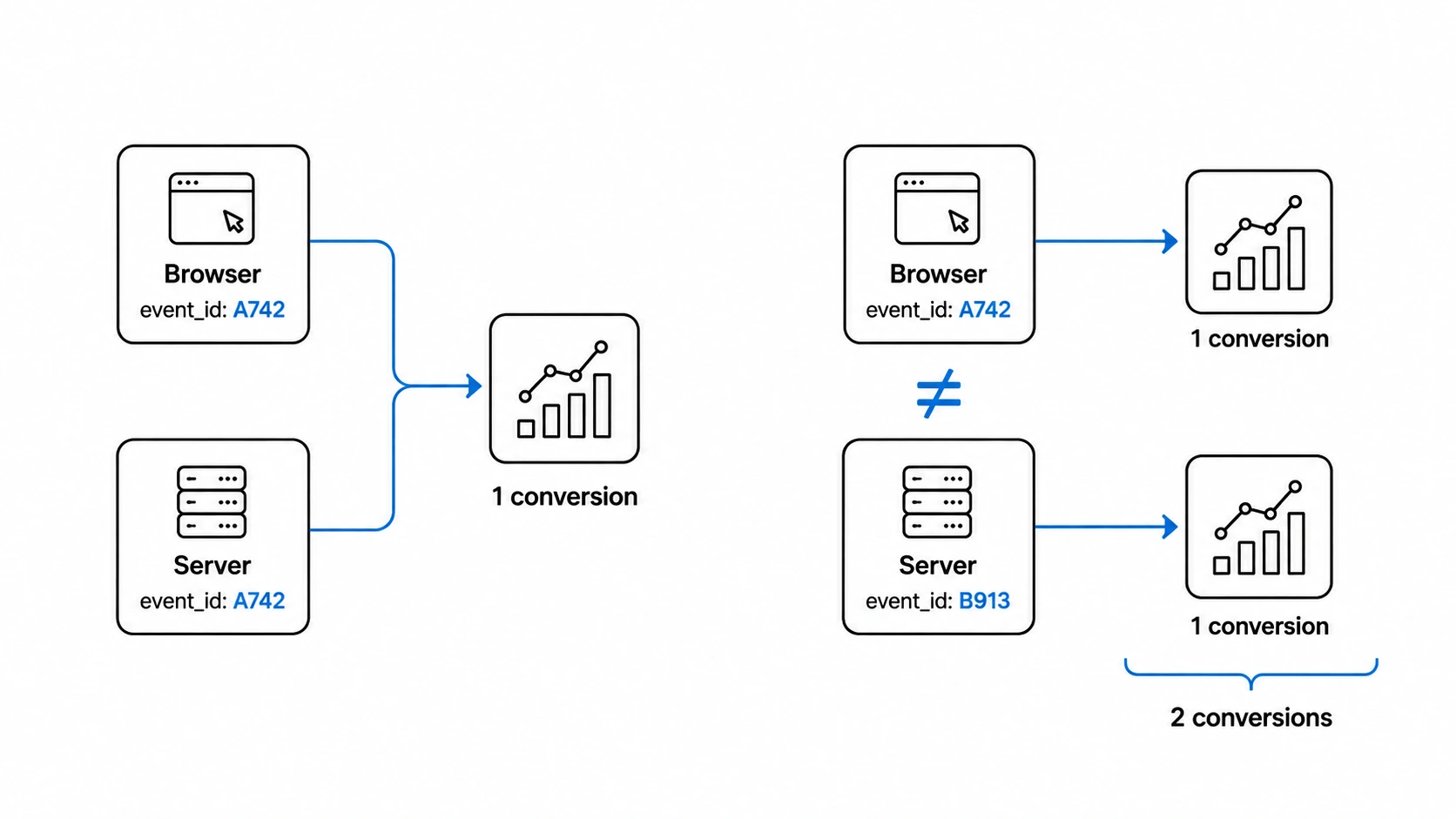 TikTok’s deduplication model is conceptually straightforward: when a browser pixel event and an Events API server event represent the same real-world conversion, you assign them an identical event_id string. TikTok’s ingestion pipeline then recognizes the pair, counts them as one event, and discards the duplicate. This is the same pattern used by Meta’s Conversions API and Google’s enhanced conversions. Executed correctly, it allows you to run both tracking channels simultaneously without inflating your conversion counts — giving you the redundancy benefits of server-side tracking without the double-counting cost.
The failure mode is in the implementation details. For deduplication to work, the event_id must satisfy three conditions simultaneously: it must be generated once per conversion event (not per page load, not per session), it must be passed identically to both the browser pixel call and the Events API payload, and it must be consistent — meaning the value cannot change between the moment the browser fires and the moment the server sends its request. In practice, all three conditions are routinely violated in PrestaShop tracking implementations.
The most frequent violation is generating the event_id independently on the client and server. A common implementation pattern assigns event_id on the browser side using a JavaScript expression like Math.random() or Date.now(), embeds it in the pixel ttq.track() call, and then — separately — generates a different event_id on the PHP server side (often using PHP’s uniqid() or a database order ID formatted differently). These two values never match. TikTok sees two Purchase events with two distinct event_ids and counts two purchases. The order ID is sometimes used as the event_id, which sounds logical, but if the browser fires the event before the order is fully committed to the database (a timing issue that occurs on PrestaShop’s payment confirmation flow, particularly with asynchronous payment gateways), the order ID may not yet be available client-side, leading to a fallback value that does not match the server-side ID.
There is also the case where event_id is present on the browser event but entirely absent from the Events API payload. The TikTok Events API specification marks event_id as optional, which leads some server-side implementations to omit it entirely. Without event_id on the server payload, TikTok has no deduplication key to match against the browser event — it will always count the server event as an additional, independent conversion. This is a particularly insidious configuration because the Events Manager may not surface an obvious error; it simply ingests both events as valid.
To illustrate the data pattern: a correctly deduplicated Purchase setup would show TikTok receiving two raw events (one browser, one server) but reporting one deduplicated conversion in Events Manager. A broken setup with mismatched event_ids would show the same two raw events but report two conversions — and in the Campaign Optimization panel, both conversions would flow into the Purchase signal used to train the Smart+ or manual CPC/CPM bidding algorithm. The algorithm now believes this campaign generated twice as many purchases as it actually did, with an average order value derived from doubled revenue figures.
- Correct pattern: browser fires Purchase with event_id = ‘ord_00112233’, server sends Purchase with event_id = ‘ord_00112233’ → TikTok deduplicates → 1 conversion recorded.
- Broken pattern: browser fires Purchase with event_id = ‘1683042811947’ (timestamp), server sends Purchase with event_id = ‘order_5821’ → no match → 2 conversions recorded.
- Missing server event_id: browser fires Purchase with event_id = ‘ord_00112233’, server sends Purchase with no event_id field → TikTok cannot deduplicate → 2 conversions recorded.
The consequence of these failures compounds over time. TikTok’s optimization algorithm is a feedback system — it uses historical conversion data to predict future high-value users and adjust bids. When the historical data systematically overstates conversion volume by a factor of two, the model’s predictions are trained on a distorted signal. Bid adjustments, audience expansion decisions, and creative performance rankings all reflect a reality that does not exist.
Diagnosing Duplicate Events: TikTok Pixel Helper and Events Manager Inspection
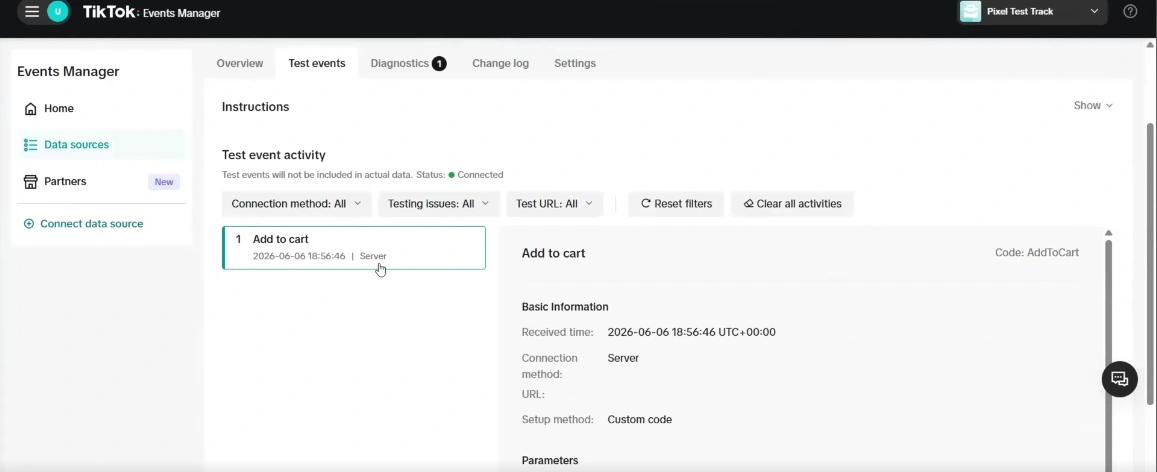 To diagnose duplicate TikTok events on PrestaShop, use the TikTok Pixel Helper extension to catch browser-side multi-firing, inspect TikTok Events Manager Diagnostics for ‘Duplicate events detected’ warnings, and cross-reference client payload event_ids in Chrome DevTools Network tab against server payloads in the Events Manager Test Events tool.
The first tool every PrestaShop merchant should use when suspecting duplicate firing is the TikTok Pixel Helper — a Chrome browser extension that intercepts outbound pixel calls in real time and surfaces the event name, pixel ID, event_id value, and any parameter payload attached to each call. It operates at the network interception layer, meaning it catches every ttq.track() call regardless of which code path triggered it: hardcoded theme snippet, PrestaShop module output, GTM container tag, or inline script block. This makes it uniquely useful for exposing parallel firing that would otherwise be invisible in the page source.
To diagnose duplicate firing on a PrestaShop store, load the Pixel Helper extension, navigate through the full conversion path — product page, add to cart, checkout, order confirmation — and watch the event log for each step. In a correctly implemented store, you will see one Pageview on page load, one ViewContent on the product page, one AddToCart on cart interaction, and one Purchase on the confirmation page. In a store with duplicate firing, you will see multiple entries for the same event type firing within milliseconds or seconds of each other on the same page. The Pixel Helper will display each event separately, and critically, it will show the event_id value — or flag its absence — for each individual call. If two Purchase events appear with different event_id strings, deduplication is guaranteed to fail. If one Purchase event has an event_id and a second has none, the same conclusion applies.
Beyond the browser extension, TikTok Events Manager provides a second diagnostic layer that operates at the account level rather than the session level. Navigate to the Events Manager for your pixel, open the ‘Diagnostics’ or ‘Activity’ panel, and examine the event detail view for your Purchase or AddToCart events. TikTok surfaces a ‘Duplicate events detected’ warning when it observes a statistical pattern of events arriving in pairs with matching timestamps and user signals but non-matching event_ids — or with no event_id at all on one of the pair. This warning is not surfaced for every duplicate hit; it appears when the pattern is statistically significant across your event volume, which means low-traffic stores may not see the warning even when duplication is occurring.
The most granular diagnostic approach is direct payload inspection via browser developer tools. In Chrome DevTools, open the Network tab, filter for requests to ‘analytics.tiktok.com’ or ‘business-api.tiktok.com’, and inspect the request payloads on your confirmation page load. Each outbound pixel request will contain the event name and parameters in the request body or query string. Look specifically for the ‘event_id’ field. Compare its value against what your server-side Events API module is sending — you can verify server payloads by checking the TikTok Events API test tool inside Events Manager, which mirrors incoming server events in near-real time. If the client-side event_id visible in DevTools does not match the server-side event_id visible in the test tool for the same order, the deduplication chain is broken.
To quickly verify your tracking status across all diagnostic layers:
- In Pixel Helper: two Purchase events firing within the same page session with different event_id values is a definitive confirmation of duplicate counting.
- In Events Manager Diagnostics: a ‘High duplicate rate’ warning on the Purchase event, combined with a raw event count that is approximately double your backend order count, confirms systematic overcounting.
- In DevTools Network tab: filter for ‘analytics.tiktok.com/api/v2/pixel/track‘ to capture browser pixel outbound calls, inspect the ‘post data’ field for event_id, and cross-reference with your server payload logs.
- In Events Manager Test Events: send a real test order and observe both the browser-sourced event and the server-sourced event appearing as separate line items — if they share event_id, Events Manager will label one as ‘Deduplicated’; if they do not, both will appear as ‘Received’ with no deduplication notation.
How PrestaShop Misconfigurations Create Systematic Overcounting
 PrestaShop misconfigurations create systematic overcounting when non-mutually exclusive hooks allow multiple modules or theme snippets to fire parallel conversion events, when GTM tags fire asynchronously alongside native PHP modules without a shared event_id, and when payment gateway callback latencies exceed TikTok’s deduplication window. Because PrestaShop executes all registered listeners on a hook without coordination, these overlapping code paths generate uncoordinated events that TikTok ingests as separate conversions.
PrestaShop’s hook architecture is one of its greatest strengths for module developers — and one of the primary structural causes of duplicate tracking events. When a merchant installs a TikTok tracking module, that module registers listeners on specific PrestaShop action hooks: displayHeader for the base pixel code, actionCartSave for AddToCart events, actionOrderConfirmation or actionOrderStatusUpdate for Purchase events. The problem emerges when those hooks are also targeted by other tracking implementations running in parallel. PrestaShop does not enforce mutual exclusivity on hooks; every registered listener fires in sequence when the hook is called. If two modules both register on actionOrderConfirmation, both will fire their respective Purchase events to TikTok when an order is placed.
A particularly common PrestaShop-specific misconfiguration involves the order confirmation page template and the hook execution order. Many PrestaShop themes include a displayOrderConfirmation hook call inside the order-confirmation.tpl or the Twig equivalent. If a module injects a pixel Purchase event into this hook, and the theme also contains a hardcoded pixel snippet in its page footer that fires a generic Purchase event on any page matching the order confirmation URL pattern, the result is two Purchase events: one with order-specific parameters from the module, one with generic or empty parameters from the theme snippet. The theme-level event will almost never carry a meaningful event_id because it is constructed statically in the template rather than dynamically from order data. TikTok receives one Purchase event with a structured event_id and order value, and one Purchase event with no event_id and no value — and counts both as distinct conversions.
The GTM conflict pattern on PrestaShop deserves specific technical attention. When a merchant implements TikTok tracking via GTM, the typical configuration pushes a dataLayer event on the confirmation page — something like dataLayer.push({event: ‘purchase’, order_id: ‘5821’, value: ‘129.00’}) — and a GTM tag fires a TikTok Purchase event in response. The GTM tag generates its own event_id internally, typically using a JavaScript variable configured in the GTM interface. Simultaneously, if the store has a PrestaShop module active on the same pixel ID, that module fires its own Purchase event from the displayOrderConfirmation hook with a separately generated event_id. Because GTM’s JavaScript executes asynchronously relative to the PHP hook’s template output, both fire on the same page load — and neither knows the other exists. There is no GTM-to-module communication channel through which a shared event_id could be established without deliberate custom engineering.
Asynchronous payment gateways introduce a third PrestaShop-specific failure mode. When a customer pays via a gateway that redirects away from the store — PayPal, Stripe, certain Klarna configurations — and then returns to an order confirmation URL, the payment confirmation event that triggers actionOrderStatusUpdate on the server may fire several seconds after the browser has already loaded the confirmation page and fired the pixel Purchase event. If the browser fires Purchase immediately on page load using a pending order ID, and the server fires Purchase only after the payment gateway callback confirms the transaction (which may be processed minutes later), the two events are separated by a significant time delta. TikTok’s deduplication window is not unlimited — events that arrive with large time separations between browser and server hits are less reliably deduplicated even when event_id values match. This means even a technically correct event_id implementation can fail in practice due to gateway callback latency.
To illustrate how these architectural conflicts directly produce tracking duplication in practice, we can break down the most common failure modes:
- Module A (legacy) registered on actionOrderConfirmation + Module B (current) registered on the same hook = two Purchase events per order, both fired server-side, both sent to the same Pixel ID, no deduplication possible because they are both server events without a corresponding browser event_id to match.
- Theme footer pixel snippet (static, no event_id) + module Purchase hook (dynamic, with event_id) = two browser-side Purchase events per confirmation page load, one deduplicatable and one not.
- GTM TikTok tag (event_id generated in GTM) + PrestaShop module (event_id generated in PHP) = two independent event_ids, guaranteed non-matching, zero deduplication.
- Payment gateway callback delay > TikTok deduplication window = deduplication failure even with matching event_ids, resulting in both browser and server Purchase events counted independently.
The Downstream Damage: Bidding Corruption, ROAS Distortion, and Audience Mistraining
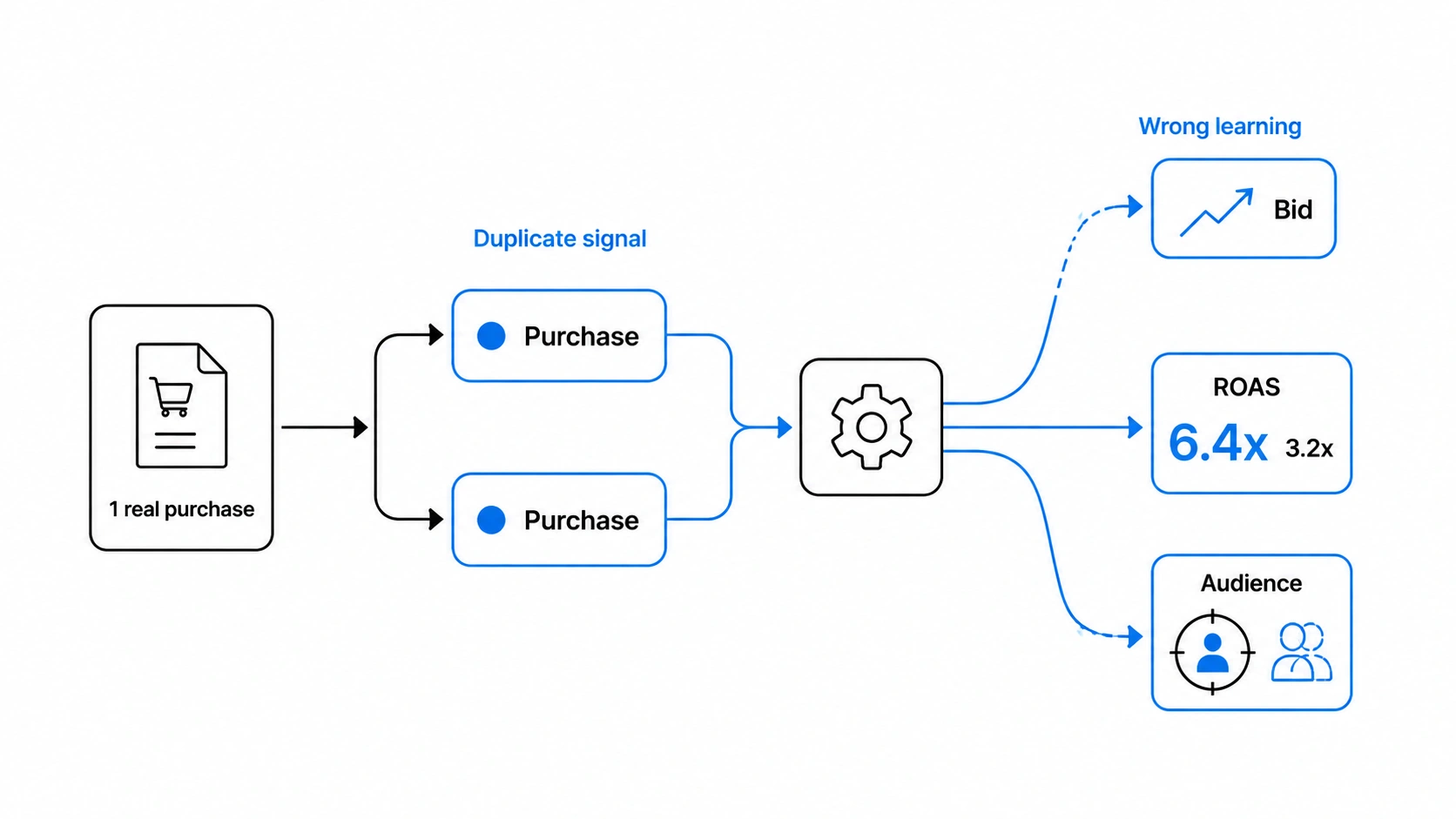 The damage that duplicate events inflict on TikTok campaign performance is not confined to inaccurate reporting numbers — it propagates through the entire optimization system in ways that actively degrade real-world results over time. TikTok’s Smart+ campaigns and manually-bid campaigns both rely on the Events API and pixel conversion signals to train the delivery algorithm. When those signals are systematically doubled, the algorithm’s model of what a ‘conversion’ looks like — which users convert, at what cost, from which creatives — is built on a distorted dataset. Every decision the algorithm makes downstream of that training data inherits the distortion.
The downstream damage of duplicate tracking events systematically corrupts campaign performance by artificially doubling reported ROAS, halving the apparent CPA, and training value-based algorithms on phantom conversion profiles. Because TikTok’s delivery model uses historical pixel and Events API signals to optimize bidding, budget allocation, and target ROAS floors, ingesting doubled revenue figures leads Smart+ and cost-cap campaigns to overspend on low-quality inventory or under-deliver while misrepresenting true business profitability.
Consider the ROAS calculation specifically. TikTok Ads Manager computes reported ROAS as total revenue attributed to TikTok ads divided by total ad spend. If every Purchase event fires twice and each carries the full order value in the ‘value’ parameter, TikTok records double the revenue. A store with €50,000 in actual monthly TikTok-driven revenue appears to generate €100,000 in TikTok’s reporting. The ROAS displayed in Ads Manager — say, 4.0x — would in reality be 2.0x. Merchants operating on this reporting without cross-referencing their PrestaShop backend order data are making scaling decisions, creative investment choices, and budget allocation calls based on a performance picture that is precisely twice as good as reality. Campaigns that appear profitable are frequently not; campaigns that appear to have headroom for budget increases are already at margin.
The inverse problem — deflated ROAS due to a different kind of tracking gap — can also occur alongside duplication. If the Events API is firing duplicate Purchase events but the browser pixel is simultaneously failing to fire on mobile browsers due to ad-blocker interference or PrestaShop’s cookie consent module blocking pixel initialization, the result is a scenario where some conversions are doubled (desktop, where both browser and server fire) and some are only server-side (mobile, where browser is blocked). The aggregate conversion count may appear plausible even though it contains both overcounting and undercounting simultaneously — a mixed signal that is particularly difficult to interpret and diagnose without segmenting Events Manager data by event source.
The bidding algorithm damage manifests differently depending on campaign type. For Smart+ Shopping campaigns using target ROAS bidding, the algorithm attempts to maintain a ROAS floor by adjusting CPMs and delivery patterns. If reported ROAS is inflated by 2x due to duplicate Purchase events, the algorithm believes it is comfortably exceeding the ROAS target and may reduce bid aggression — resulting in under-delivery and lost impression share that the merchant misinterprets as audience saturation. For cost-cap campaigns targeting a cost-per-purchase ceiling, the algorithm sees its CPA as half of actual because it counts twice the purchases for the same spend — which causes it to bid more aggressively than warranted, overspend into low-quality inventory, and then fail to hit the cost cap when the true CPA is measured against actual backend orders.
Audience quality degrades over the optimization window as well. TikTok’s value-based audience modeling — used in both Smart+ and manual campaigns with value optimization — assigns predicted lifetime value scores to user segments based on observed purchase behavior. When purchase events are doubled, users who made one purchase appear as repeat purchasers; users who spent €80 appear as customers who spent €160. The value-based audience model learns to target users who statistically resemble these inflated profiles, which in practice means it optimizes toward a phantom user segment that does not actually exist in the advertiser’s real customer base. Retargeting audiences built on pixel event history also become polluted: a ‘purchased in last 30 days’ audience may contain duplicated entries or users whose purchase signals were fired multiple times, skewing the audience size estimates and overlap calculations used in campaign planning.
In summary, the key symptoms of this tracking distortion include:
- Reported ROAS 2x above true ROAS: the most common symptom of systematic duplicate Purchase event firing with order value passed in both events.
- TikTok purchase count approximately 2x PrestaShop backend order count over the same attribution window: the clearest quantitative confirmation of duplication — compare Orders in PrestaShop back office against Purchases in TikTok Events Manager for the same date range.
- Smart+ campaigns underdelivering against budget with no audience exhaustion signal: consistent with a target ROAS algorithm that believes it is outperforming target due to doubled conversion signals.
- Cost-cap campaigns overspending with CPA appearing on-target in TikTok but 2x target when measured against actual orders: consistent with duplicate Purchase events halving the apparent CPA within TikTok’s model while real acquisition cost remains uncorrected.
The Correct Fix: Shared event_id, Server-Side Events API, and Full-Parameter Coverage on Every Event
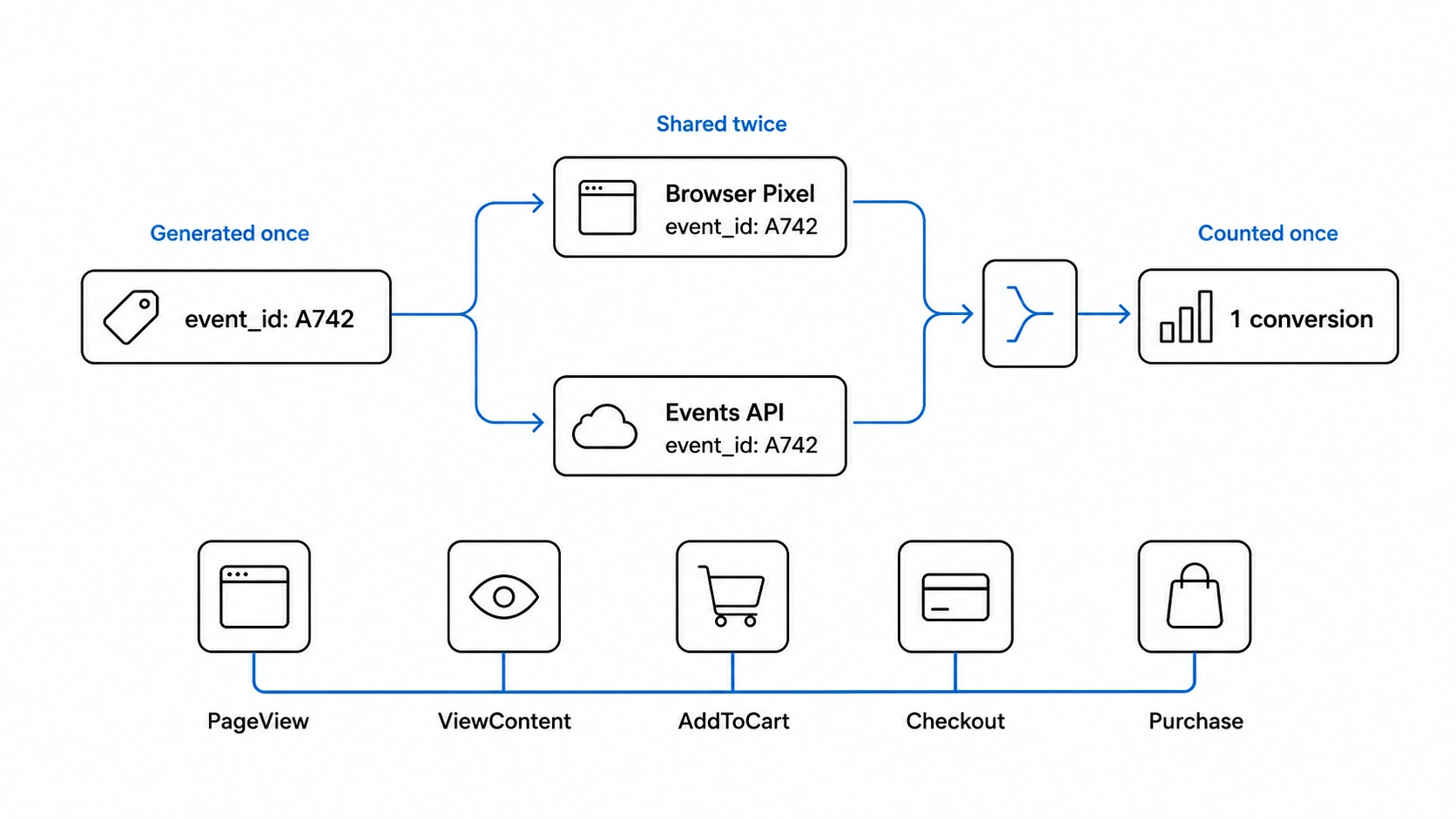 Solving duplicate event firing on PrestaShop requires generating a single, deterministic event_id server-side in PHP, running the browser pixel in parallel with the TikTok Events API, and passing complete parameter coverage across all five funnel events. Rather than patching symptoms or relying on fragmented modules, establishing a unified client-server architecture ensures that every conversion is matched identically and deduplicated reliably by TikTok’s algorithm.
Solving duplicate event firing on PrestaShop requires addressing the problem at its architectural root rather than patching individual symptoms. The correct implementation has three non-negotiable components: a single event_id generated once per conversion event and shared identically between the browser pixel call and the server-side Events API payload, server-side tracking via the TikTok Events API running in parallel with — not instead of — the browser pixel, and full parameter coverage across all five tracked events so TikTok’s algorithm receives rich, structured signals rather than thin or partial data.
The event_id implementation is the most critical piece. The correct pattern is to generate the event_id server-side — in PHP, at the point where the relevant PrestaShop hook fires — and inject that same value into the browser-rendered page so the JavaScript pixel call picks it up from the DOM rather than generating its own independent value. This means the event_id is created exactly once, by one authoritative source, and both the client and server use that single value. For the Purchase event specifically, the event_id should incorporate the order ID to ensure uniqueness per transaction: a value like ‘purchase_’ concatenated with the PrestaShop order ID is deterministic, non-colliding, and consistent regardless of when the browser fires relative to the server callback. This approach also handles asynchronous payment gateway scenarios correctly — because the event_id is derived from the order record, it is stable across any time delta between the browser page load and the server-side confirmation hook.
The TikTok Events API server call must be sent from a PrestaShop hook that fires reliably after order confirmation — actionValidateOrder or actionOrderStatusUpdate with the appropriate status filter — and its payload must include the full set of required and recommended parameters: event_id, event_time, user data (hashed email and phone where available), and the properties object containing content_id, content_name, value, and currency. Omitting any of these degrades both deduplication reliability and match quality in TikTok’s audience modeling.
Full five-event coverage matters because TikTok’s optimization algorithm uses the entire funnel signal — not just Purchase — to build conversion prediction models. Pageview establishes baseline traffic context. ViewContent identifies product-level intent. AddToCart and InitiateCheckout provide mid-funnel dropout signals that inform value-based bidding. Purchase is the terminal optimization event. Firing all five with consistent parameters and correct event_ids gives TikTok’s algorithm the complete behavioral picture it needs to identify high-value audiences accurately.
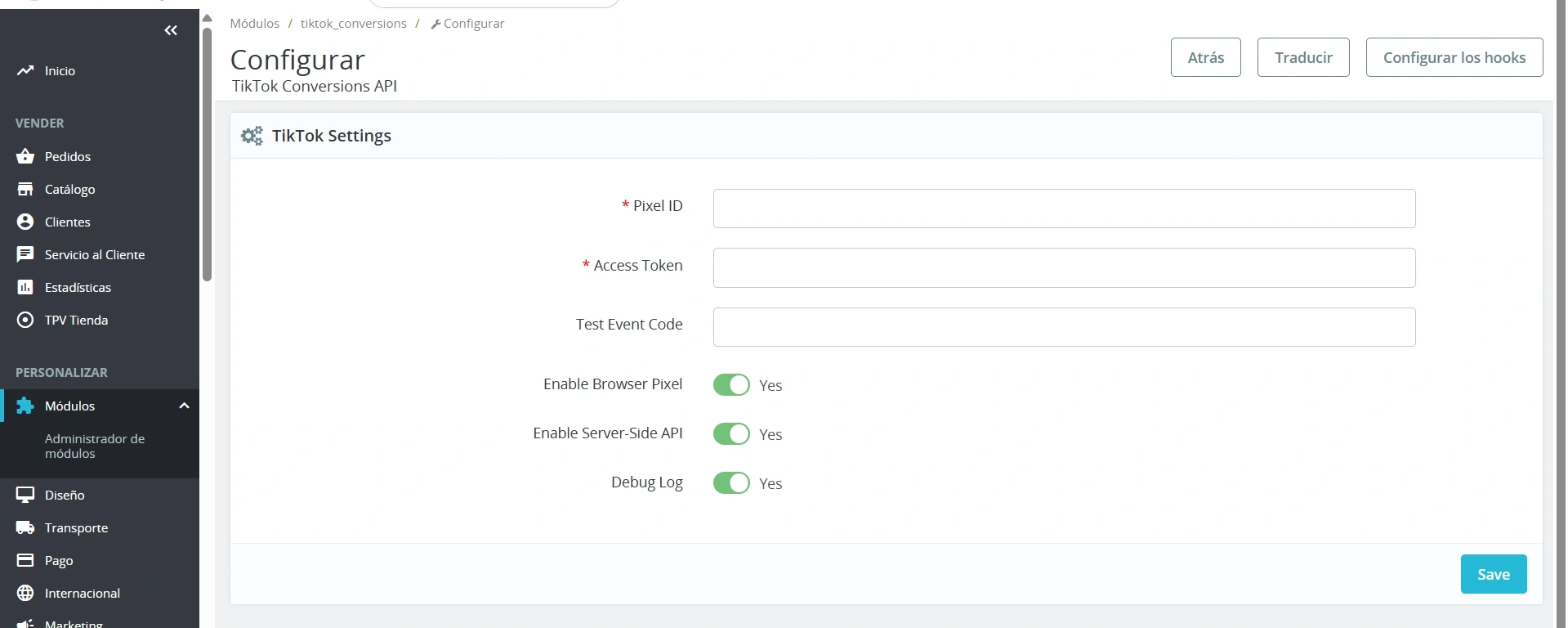
This is the exact architecture that Pixel Track TikTok implements for PrestaShop. The module fires all five events — Pageview, ViewContent, AddToCart, InitiateCheckout, and Purchase — through both the browser pixel and the TikTok Events API, with a single shared event_id generated server-side and passed consistently to both channels on every event. There is no client-server ID mismatch, no missing event_id on the server payload, and no risk of parallel module conflict because the implementation is self-contained. Compatible with PrestaShop 1.7, 8.0, 8.1, and 8.2, it replaces fragmented, misconfigured tracking stacks with a single correctly architected integration — and includes technical support to ensure the setup is verified against your store’s specific configuration.
Stop Letting Duplicate Events Train TikTok on a Lie
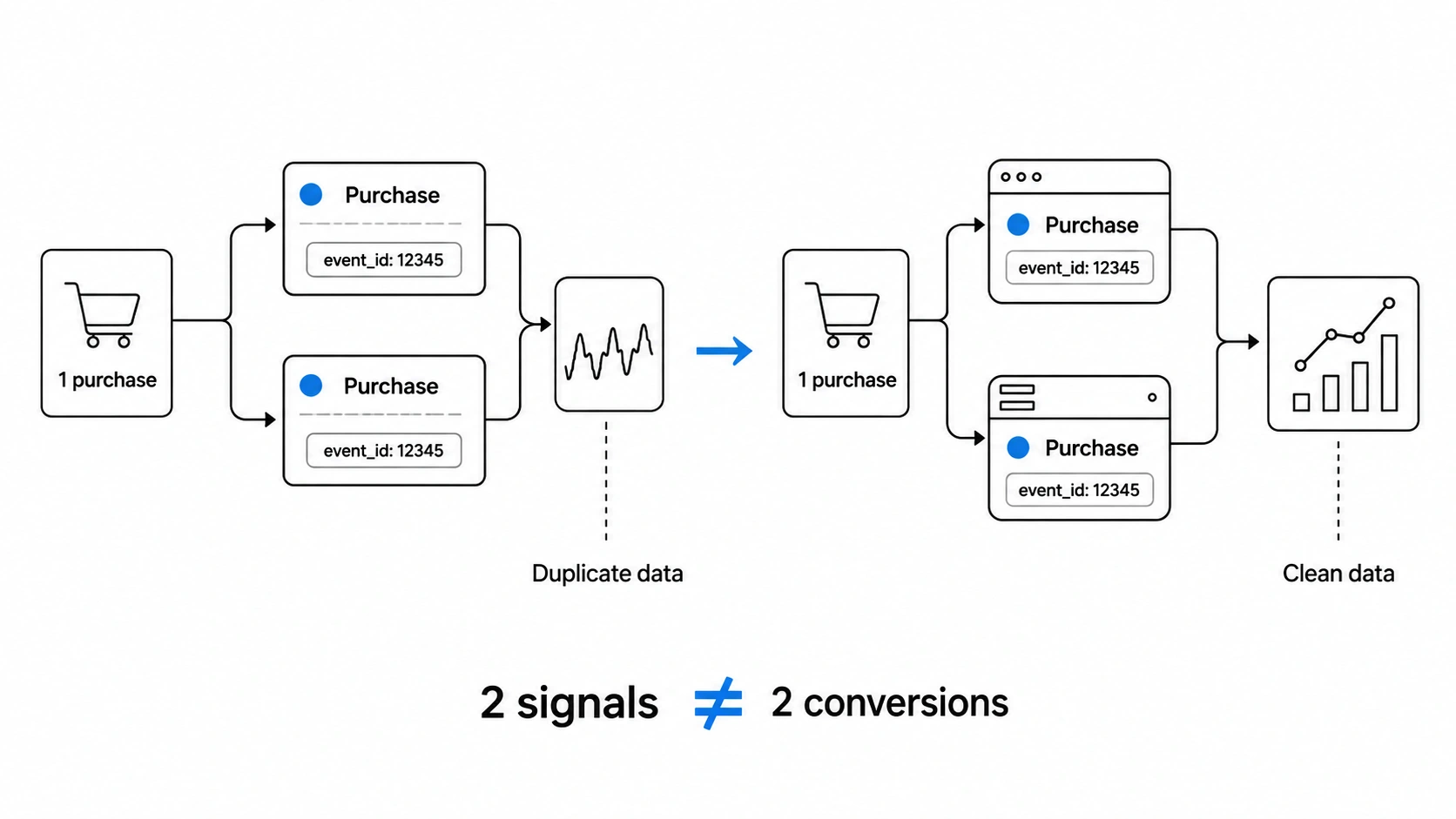 Every signal your TikTok pixel fires is a vote — a piece of evidence the algorithm uses to decide who to reach, how much to bid, and which creatives to scale. When duplicate events corrupt that signal, you are not just seeing wrong numbers in Ads Manager. You are actively training TikTok’s bidding engine on data that does not reflect reality, scaling campaigns that are underperforming, and making budget decisions anchored to a ROAS figure that is structurally inflated. The damage compounds with every additional conversion your pixel fires incorrectly.
The technical root cause is solvable. A single, consistently shared event_id passed through both your browser pixel and your Events API server call — covering all five events with full parameters — is the difference between a tracking stack that works and one that quietly sabotages your campaigns. The implementation has to be correct at every layer: no legacy modules firing in parallel, no GTM conflicts, no server payloads missing the event_id field, no client-server mismatch on the ID value itself.
If you are running TikTok Ads on PrestaShop, Pixel Track TikTok is the module built to solve this precisely. It handles full browser pixel tracking and server-side Events API integration with a shared, consistent event_id across all five events — Pageview, ViewContent, AddToCart, InitiateCheckout, and Purchase — with complete parameter coverage on every call. Compatible with PrestaShop 1.7, 8.0, 8.1, and 8.2, with technical support included. Get your tracking right before your next campaign spend compounds the problem further. Visit pixeltracktiktok.com to get started.